
A trash you empty when you are sure
PrunePic never deletes a photo the moment you swipe. Everything you trash waits in the PrunePic Trash, where you can put items back or delete them all at once, and iOS still keeps them in Recently Deleted for 30 days after that.
From swipe to gone, in five steps
A photo you swipe away in PrunePic goes through two safety nets before it is really gone: the PrunePic Trash, then Recently Deleted in the Photos app.
- 1You swipe leftThe photo is queued. It is still in your library.
- 2PrunePic TrashPut it back any time. Undo reverses your last swipe.
- 3You empty the trashiOS asks you to confirm the deletion.
- 4Recently DeletedKept in the Photos app for up to 30 days. You can still recover it.
- 5Gone for goodAfter 30 days, or when you delete it from Recently Deleted.
1. Swipe left to mark a photo
When you drag a photo to the left, the card turns red and a TRASH stamp appears. Let go and the photo is queued in the PrunePic Trash. It is still in your library and in iCloud Photos.


2. Undo the last swipe
Moved too fast? Tap Undo in the bottom bar right after a swipe and the photo comes back to the feed, untouched. Undo works for a keep or a favorite too, not only for trash.
3. Check the PrunePic Trash
Tap the trash counter in the bottom left to open the PrunePic Trash. It shows how many items are waiting and how much space they take, with every photo listed with its date, size and resolution.
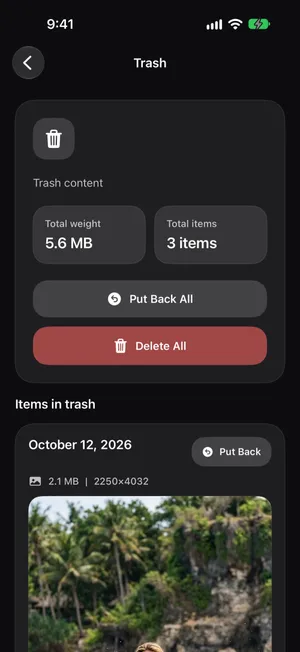
Nothing here is deleted yet. You can leave photos in the trash for as long as you like and empty it once a week, or after every session.
4. Confirm with iOS
When you tap Delete All, iOS steps in and asks you to confirm. PrunePic cannot skip this step, and the message spells out what happens next.

5. Recently Deleted keeps them for 30 days
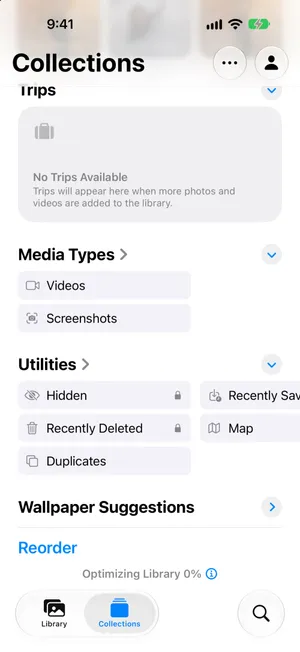
Deleted photos move to Recently Deleted in the Photos app: open Collections, scroll to Utilities and tap Recently Deleted. The album is locked by default, so you unlock it with Face ID or your passcode. From there you can recover a photo, or delete it for good to free the space right away.

Undo, Put Back and Recently Deleted are different
| Undo | Put Back | Recently Deleted | |
|---|---|---|---|
| Where | PrunePic bottom bar | PrunePic Trash | Photos app |
| When | Right after a swipe | Any time before you empty the trash | Up to 30 days after you empty it |
| What it does | Reverses your last keep, trash or favorite | Returns a photo to your feed | Restores a deleted photo to your library |
Frequently asked questions
Can I undo a swipe in PrunePic?
Yes. Right after a swipe, tap Undo in the bottom bar to reverse it. Later, open the PrunePic Trash and tap Put Back on any item that is still waiting there.
Where do photos go when I empty the PrunePic Trash?
After you confirm, they move to Recently Deleted in the Photos app, where iOS keeps them for 30 days before removing them for good. You can recover them from there during that time.
Does PrunePic ever delete photos automatically?
No. Photos are only removed from your library when you empty the PrunePic Trash yourself, and iOS asks you to confirm every deletion.
Do photos in the PrunePic Trash still use storage?
Yes. They stay in your library until you empty the trash, and after that they keep using storage in Recently Deleted for up to 30 days. Delete them from Recently Deleted in the Photos app to get the space back right away.
Can I recover a photo after it is gone from Recently Deleted?
Not from your iPhone. Once a photo leaves Recently Deleted, the only copy left would be in a backup you made before deleting it.
Keep reading
- FeaturesSwipe to delete, keep or favoritePrunePic shows your iPhone photos and videos one at a time. Swipe left to delete, up to keep, right to favorite, and clear a camera roll in minutes.
- FeaturesTrack your cleanup progressSee what you deleted, how much it weighed, and what is left in your library by media type. PrunePic insights are calculated and stored on your iPhone.
- GuidesiPhone storage full: what to do right nowiPhone storage full and blocking photos or updates? Get space back in minutes, find out why deleting photos did not help, and stop it filling up again.
- GuidesHow to delete photos from iPhone but not iCloudWith iCloud Photos on, a deletion on your iPhone deletes everywhere. Here are the two safe ways to clear photos from your iPhone and keep them in iCloud.