
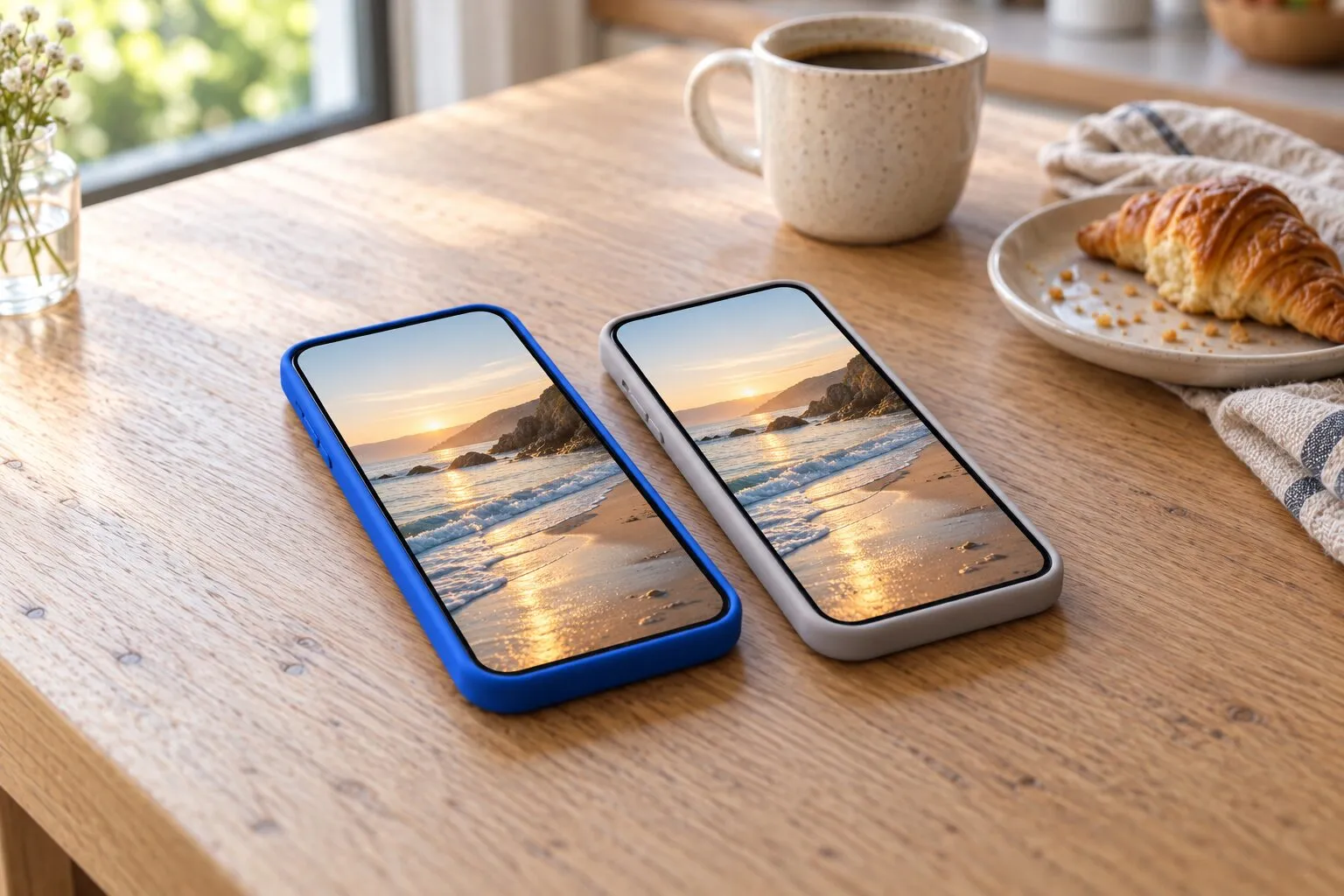
PrunePic vs Swipewipe
Both apps clean up your camera roll one swipe at a time. Swipewipe has more extras, such as an AI photo enhancer, a photo map and streaks, and runs on iOS 18, iPad and Android; its free version has ads and a swipe allowance that refills after a countdown. PrunePic has no ads, gives you 10 decisions a day for free, files the photos you keep into albums in the same swipe, and holds everything you delete in a trash you check first.
| Feature | PrunePic | Swipewipe |
|---|---|---|
| How you swipe | Left to delete, up to keep, right to favorite or file into an album | Right to keep, left to delete |
| When photos are deleted | When you empty the PrunePic Trash, whenever you choose; iOS asks you to confirm, then Recently Deleted | After a review screen at the end of each list; iOS asks you to confirm, then Recently Deleted |
| Undo | Undo the last swipe; Put Back anything from the trash | Undo button, or tap the photo; change choices on the review screen |
| File into albums while you swipe | Yes: three pinned albums in the swipe tray, any album, or a new one | Not mentioned on its website or App Store page; you can clean an existing album |
| Set photos aside for later | No | Yes, bookmarks |
| Free version | 10 decisions a day | A limited number of swipes, then a countdown or a short video for more |
| Ads | None | In the free version; the subscription removes them |
| In-app purchases on the US App Store | PrunePic Pro, weekly or yearly: $4.99, $29.99 and $49.99 listed | Weekly plans from $3.99 to $9.99, a $29.99 yearly plan and two "Premium" items listed |
| Remembers your progress | Yes: photos you reviewed never come back | Yes: progress per month, finished months crossed off |
| Duplicates | No duplicate finder | Piles of identical and near-identical photos to swipe through |
| Extras | On This Day, Trips & Moments, widgets, cleanup insights | AI photo enhancer, Places map, Faces, Supercut videos, streaks, widgets |
| Devices | iPhone with iOS 26 or later, Mac with Apple silicon, Apple Vision | iPhone and iPad with iOS 18 or later, Apple Vision, Android |
| Languages | English, French, German, Spanish, Italian | 12, including English, French, German, Spanish and Italian |
| App size | 33.5 MB | 241.5 MB |
Both apps turn your camera roll into a stack of cards you swipe through, and both are free to download. They differ in what happens around the swipe: what you can do with the photos you keep, when deleted photos actually leave your library, and how the free version is limited.
We make PrunePic, so read this with that in mind. We did not install Swipewipe for this page: everything about it comes from its App Store page, its website and help pages, its privacy policy, and 1,000 recent App Store reviews. Checked on October 24, 2026.
The short version
- Pick Swipewipe if you want extras around the cleanup, such as AI enhancement of old or blurry photos, a map of your photos, highlight videos and daily streaks, or if you use an iPad, an Android phone or an iPhone on iOS 18.
- Pick PrunePic if you want an app without ads, a daily allowance you can count, the photos you keep filed into albums in the same swipe, and a trash where you check everything before it leaves your library.
How each app cleans
Swipewipe works through lists: each month, recent photos, On This Day, a random set, duplicates, your albums, and, with a subscription, places on a map. Each photo is a card: swipe right to keep it, left to mark it for deletion. An undo button, or a tap on the photo, takes you back, and you can bookmark a photo to decide later.
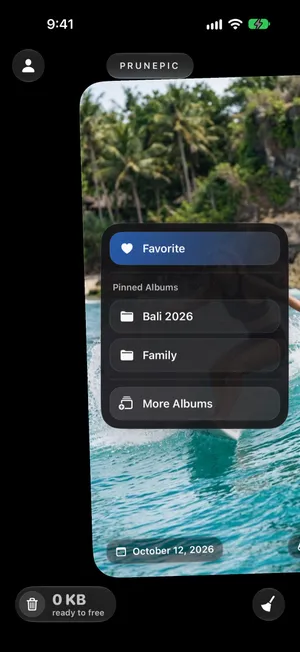
PrunePic shows your library one photo or video at a time, full screen. Swipe left to send it to the PrunePic Trash, up to keep it, right to add it to Favorites or drop it on an album. Up to three pinned albums sit in the swipe tray, and you can pick any album or create one; album filing puts the photo in a regular Photos album. Cleaning modes focus the feed on screenshots, videos sorted longest first, a batch, a single trip or today’s date in past years.
When your photos are actually deleted
In both apps, a left swipe only marks a photo. Nothing leaves your library until a final step, and then iOS asks you to confirm and the photos sit in Recently Deleted for 30 days.
- Swipewipe deletes at the end of each list. When you reach the end, a review screen shows the photos you marked; you can change your mind there, then confirm. Its help page also mentions a trash button for deleting earlier, when it is available. The same page answers “why aren’t my photos deleted when I swipe?” with this step: until you confirm, nothing is deleted.
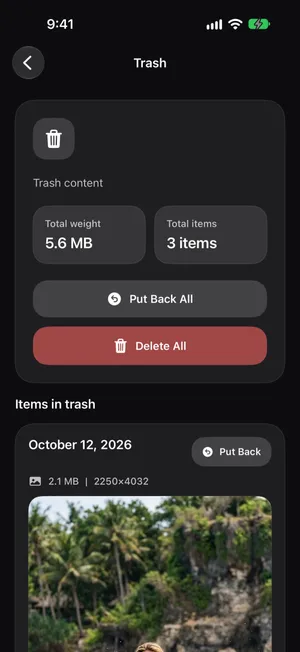
- PrunePic collects everything you swipe left in the PrunePic Trash, across sessions and modes, with a counter of how much it weighs. You empty it when you choose: after five photos or after five hundred. Put Back returns anything, and Undo reverses your last swipe.
The difference matters if you clean in short bursts. In PrunePic, you can stop anywhere and come back tomorrow; your decisions and the trash are saved. If you are wondering why your storage did not change, iPhone storage full explains Recently Deleted and iCloud, and how to recover deleted photos covers getting one back.
Free version, ads and pricing
Swipewipe’s free version has ads. Its help page says the free version limits the number of swipes: when you reach the limit, a countdown starts, or you can watch a short video to get more. Reviewers describe the allowance as roughly one list, or about 20 swipes, every seven to eight hours, and since mid-September 2026 many free users report watching an ad before a deletion completes. The subscription removes the ads and the limit, and unlocks extras such as the AI enhancer, the Places map, Time Travel for missed On This Day dates, and tools to compress, trim and split videos.
On October 24, 2026, Swipewipe’s US App Store page listed weekly plans from $3.99 to $9.99, a yearly plan at $29.99, and two items named “Premium” at $5.99 and $9.99 without a stated period. Reviewers and press describe a 3-day trial, and US reviewers most often mention $9.99 a week. None of the listed purchases is named as lifetime.
PrunePic’s free plan gives you 10 decisions a day in the Everything and Random modes, with the trash, Undo, Favorites and widgets included, and no ads. Every keep, delete, favorite or file counts as one decision. PrunePic Pro, weekly or yearly, removes the daily limit and unlocks the Photos, Screenshots, Videos, Batch, On This Day and Trips & Moments modes. Its US App Store page lists in-app purchases at $4.99, $29.99 and $49.99.
Privacy and what leaves your phone
The App Store privacy labels, as each developer declares them, on October 24, 2026:
| Swipewipe | PrunePic | |
|---|---|---|
| Data used to track you | Identifiers, usage data, other data | Identifiers |
| Data linked to you | Purchases, identifiers, usage data, other data | None |
| Data not linked to you | Diagnostics | Identifiers |
Swipewipe’s help page says it needs access to your full photo library. Its privacy policy, shared by MWM’s apps, says AI features may send images you upload to AI providers such as OpenAI, Google Gemini or Anthropic, where relevant to the app. Swipewipe’s pages do not say whether its AI enhancer works on your iPhone or sends the photo out.
PrunePic reads your photos through Apple’s Photos framework, works on them on your iPhone, and never uploads them. It records how the app is used, with Firebase Analytics and Mixpanel, and measures which ads bring people to it with the Meta SDK; those events never include your photos. The privacy policy lists them.
What Swipewipe reviewers mention
These are customers’ reports, not tests of ours. In 700 App Store reviews rated 1 to 3 stars between May 2025 and October 2026, from 11 countries:
- Ads come up in about 24%, rising to 39% of the reviews from the last six months, as longer ads and ads before deletions appeared.
- Paying comes up often: about 18% hit a paywall straight away, 18% mention the free limit, 15% the price, and 6% a billing problem such as a charge after cancelling.
- Reliability comes up in about 28%. The most common report, in about 11% of these reviews, is photos still in the library after swiping; Swipewipe’s help page points to one cause, the end-of-list step described above. Versions 3.5.1 and 3.5.2, from October 2026, both say they fix issues with deleting photos.
- Lost progress after an update or a crash comes up in about 6%.
In 300 reviews rated 4 or 5 stars between June and October 2026, people praise the space they got back (about 27%), how easy and fun it is (20%) and how fast it goes (13%), and some like going month by month and the On This Day nostalgia.
Where Swipewipe is better
- More devices. It runs on iPhone and iPad with iOS 18 or later, on Apple Vision and on Android. PrunePic needs iOS 26 on iPhone, and runs on Macs with Apple silicon and on Apple Vision, but has no iPad or Android version.
- More languages. Swipewipe’s App Store page lists 12. PrunePic’s app is in English, French, German, Spanish and Italian.
- More extras. An AI photo enhancer, a Places map, Faces, Supercut highlight videos, streaks, and duplicate piles have no PrunePic equivalent.
- Decide later. Bookmarks set a photo aside for another day. In PrunePic, you keep it, delete it or file it.
- A long track record. Swipewipe has been on the App Store since 2022 and has about 99,000 US ratings averaging 4.7. Its developer says it has passed 25 million downloads.
The bottom line
If you want the most features, or you use an iPad or Android phone, Swipewipe does more. If ads and a refilling swipe allowance put you off, or you want each keeper filed into an album as you go and every deletion waiting in a trash you control, PrunePic is built for that. Both are free to try; the clean-up guide works with either.
Frequently asked questions
Is PrunePic a free Swipewipe alternative?
PrunePic is free to download and includes 10 decisions a day with no ads, where every photo you keep, delete, favorite or file counts as one. PrunePic Pro removes the limit and unlocks the focused modes. Swipewipe's free version has ads and a limited number of swipes; at the limit, a countdown starts, or you can watch a short video for more.
Why are my photos not deleted after swiping in Swipewipe?
Swipewipe deletes the photos you swiped left when you confirm on the review screen at the end of a list, or earlier from its trash button when it is available, as its help page explains. Until then, nothing has been deleted. In PrunePic, photos you swipe left wait in the PrunePic Trash, and you can empty it whenever you like, then confirm in iOS.
Does Swipewipe have ads?
Yes, in the free version: the App Store lists it as containing advertising, and Swipewipe's help page says the subscription removes the ads. PrunePic has no ads, on the free plan or with Pro.
How much does Swipewipe cost?
On October 24, 2026, Swipewipe's US App Store page listed weekly plans from $3.99 to $9.99 and a yearly plan at $29.99. Reviewers most often report a 3-day trial followed by $9.99 a week. Prices vary by country and offer, so check the plan the app shows you before you start a trial.
Which swipe means delete in Swipewipe and PrunePic?
Left means delete in both. To keep a photo, Swipewipe uses a swipe right and PrunePic a swipe up; in PrunePic, a swipe right adds the photo to Favorites or files it into an album.
Is this Swipewipe the same app as Swipe Photo Cleaner?
No. This page compares Swipewipe: Photo Cleaner by MWM. A different app from another developer uses a similar name.
Keep reading
- FeaturesSwipe to delete photos, one at a timePrunePic shows your iPhone photos and videos one at a time. Swipe left to delete, up to keep, right to favorite. Nothing is gone until you empty the trash.
- FeaturesUndo any swipe before a photo is deletedPrunePic never deletes a photo when you swipe. Undo it, swipe back or Put Back from the PrunePic Trash, then delete the rest in one batch you confirm in iOS.
- FeaturesSort photos into albums while you swipePrunePic is a photo organizer for iPhone that files keepers as you clean: swipe right, drop the photo on a pinned album, or search your albums or create a new one.
- FeaturesPhoto cleanup modes for screenshots, videos and tripsClean your iPhone camera roll by category: screenshots, videos longest first, a batch, a trip or today's memories. Photos you reviewed stay out of every mode.
 ComparePrunePic vs Apple PhotosWhen the iPhone's Photos app is enough to clean up your library, and when a swipe app like PrunePic saves time. An honest comparison, tested on iOS 27.
 GuidesHow to clean up your iPhone photosClean up iPhone photos without burning out: a 10-minute first pass, simple rules for what to keep, a way to never lose your place, and a routine that keeps it clean.