

How to find and recover deleted photos on iPhone
Open Photos, tap Collections, then Recently Deleted under Utilities, and unlock it with Face ID. Tap Select, choose the photos and videos, tap the More button, then Recover. Deleted items stay there for 30 days, unless your iCloud storage was over its limit when you deleted them. Not there? Check Hidden, your library view and your Apple Account before you assume the photo is gone.
Recover deleted photos and videos from Recently Deleted2 minutes
- Open Recently DeletedOpen Photos, tap Collections, scroll to Utilities and tap Recently Deleted. Tap View Album and unlock it with Face ID, Touch ID or your passcode.
- Select what to recoverTap Select, then tap the photos and videos you want back. To bring back everything, select nothing: tap the More button, then Recover All.
- RecoverTap the More button, tap Recover, then confirm. The items go back to your library.
Deleted something you need? Don’t delete anything else for now. On iPhone, a deleted photo is rarely gone at once: it waits in Recently Deleted for 30 days. And a photo that seems deleted is often only hidden, or showing in another view of your library. Here is how to find it, tested on iOS 27 in the Simulator and checked against Apple’s own guide.
Where to find deleted photos on iPhone
Where you look depends on what happened to the photo. Find your case:
| What happened | Where the photo is | What to do |
|---|---|---|
| You swiped it away in a cleaner app but never confirmed a deletion | Still in your library | Put it back in the app, or simply keep it |
| You deleted it in the last 30 days | Recently Deleted | Recover it, see below |
| You hid it | Hidden | Unhide it |
| It was in a Shared Library, or the library is filtered | Another library view | Switch the view or clear the filter |
| More than 30 days ago, removed from Recently Deleted, or iCloud was full | No longer on your iPhone or in iCloud | Look for a copy kept somewhere else |
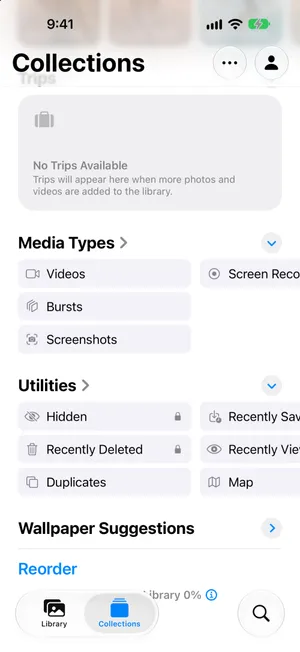
Recover photos from Recently Deleted
Videos and photos go to the same place, so these steps work for both.
- Open Photos and tap Collections.
- Scroll to Utilities and tap Recently Deleted.
- Tap View Album and unlock with Face ID, Touch ID or your passcode.
- Tap Select, then tap each photo or video you want back.
- Tap the More button at the top, tap Recover, then confirm with Recover 2 Photos (the button counts your selection).



The photos go straight back into your library. Their date does not change, so a photo taken last summer returns to last summer, not to today. If you cannot spot it, sort your library by date and jump to the month it was taken.
To bring everything back, tap Select without choosing any photo, tap the More button and tap Recover All. Apple’s menu puts Delete All right above it, so read before you tap: Delete All removes every item for good. If an empty library is what you want, how to delete all photos from iPhone is the guide for that.
To check one photo first, tap its thumbnail. It opens full screen with its date, and Delete and Recover buttons at the bottom. Tap Recover, then Recover Photo.


With iCloud Photos on, Recently Deleted is the same on all your devices, so a photo you recover on your iPhone comes back on your iPad and Mac too.
How long you have: 30 days, with one exception
Deleted photos and videos stay in Recently Deleted for 30 days. Tap the info button next to the item count and Photos explains the number on each thumbnail: it is the days left before deletion. After that, Apple’s guide says the items are removed for good: from your iPhone and, with iCloud Photos, from iCloud and every other device on your Apple Account.
Two things make a deletion final sooner:
- You delete the item from Recently Deleted, one by one or with Delete All. There is no undo.
- Your iCloud storage is over its limit. Apple warns that in that case photos and videos you delete are removed immediately and are not available in Recently Deleted. The guide to a full iCloud storage explains how to get back under the limit.
While you search, leave Recently Deleted alone. Items there do not count toward your iCloud storage, so there is no rush to empty it. They do still use space on the iPhone, which only matters if it is full: iPhone storage full covers that.
Recently Deleted is empty or the photo is missing
A photo that is not in Recently Deleted may never have been deleted. Go through these before you give up on it. Apple’s article on missing photos lists most of the same checks.
Is it hidden?
Apple’s guide is clear: hidden photos move to the Hidden collection and you can’t view them anywhere else, so they are missing from your library and albums. iOS tells you where they go when you hide one.
- In Collections, scroll to Utilities and tap Hidden.
- Tap View Album and unlock.
- Touch and hold the photo, or open it and tap the More button, then tap Unhide.
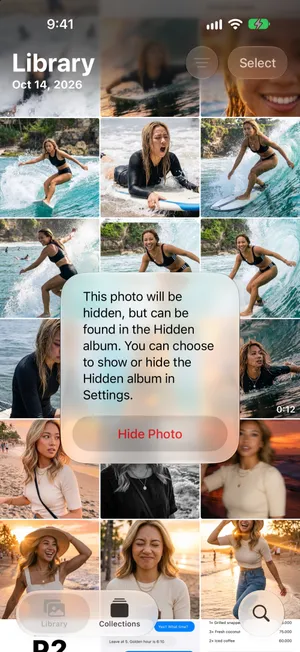

No Hidden in Utilities? It can be turned off: go to Settings › Apps › Photos and turn on Show Hidden Album.
Is it in Recovered?
If a photo or video was not saved properly and could not be added to your library, Apple’s guide says a copy may be in Recovered, in Utilities. If your Utilities list shows it, open it and restore the photo to your library. Do not delete anything there unless you are sure: Apple says items deleted from Recovered cannot be recovered.
Are you looking at the right library?
- Shared Library. If you share a library with family, some photos only appear in some views. In Collections, tap your account picture at the top right and, under Library View Options, choose Both Libraries.
- Filters. The sort button in Library can filter the grid to Favorites, one media type or a keyword. Set it back to All Items. If screenshots are missing, check View Options › Show › Screenshots: when it is unchecked, screenshots stay out of the grid but are still in Media Types › Screenshots.
- Years and Months. These views show a selection of your best shots, so a photo can be missing there and still be in All.
Is iCloud Photos on, with the right Apple Account?
If the photo was taken on another device, or before a change in your settings, it may simply not be on this iPhone yet. Go to Settings, tap your name, then iCloud › Photos and check that Sync this iPhone is on. Your Apple Account is the email address under your name: it must be the same one on the device the photo came from. After turning sync on, connect to Wi-Fi and give it a few minutes.
Search for it
Type what you remember in Search: a place, a person, a word that appears in the photo. Recently Viewed and Recently Saved in Utilities are worth a look too, for a photo you just opened or saved from another app.
Can you find deleted photos on iCloud.com?
With iCloud Photos on, Photos on iCloud.com gives you another way to reach the same library when your iPhone is not available. Apple’s photo-recovery instructions explain how to use Recently Deleted on the website. Use the Apple Account that held the photos.
This is the same recovery window, not a second backup. A synced deletion reaches iCloud too. A photo removed permanently or already past its recovery window does not get another 30 days on the website. If iCloud Photos was never enabled for that photo, the website may not have a copy at all; check the other copies below.
When a photo is gone for good
If a photo left Recently Deleted, your iPhone and iCloud no longer have it. No setting brings it back, and PrunePic cannot either. What you can still find is a copy that was made before you deleted it:
- A computer you imported or synced photos to, such as the Photos library on a Mac.
- Another cloud service that backed up your camera roll, such as Google Photos, Dropbox or OneDrive. Look in its own trash too.
- Messages and chats. A photo you sent someone still exists in that conversation. It may be a smaller copy, but it is better than nothing.
- Shared Albums may still contain a copy you shared. Apple’s Shared Albums guidance explains how to save it. Older shared items may be reduced-resolution copies; new or upgraded albums on iOS 27 support full-resolution sharing, so check the actual copy available.
- An iPhone backup made before the deletion, on a computer, or in iCloud if iCloud Photos was off. Restoring a backup replaces everything on your iPhone with its contents, so anything newer would be lost. Treat it as a last resort and ask Apple Support first.
Prevent the next scare
- iCloud Photos is sync, not backup. A deletion on one device reaches all of them. The guide to deleting photos from iPhone but not iCloud explains how that works, and why a second copy elsewhere is the only real safety net.
- Don’t empty Recently Deleted right after a cleanup. Wait a few days unless you need the space. That is your window to notice a mistake.
- Review before anything is deleted. A cleanup that asks you to confirm in batches gives you a moment to look at what is going.
Where PrunePic fits: before you delete
PrunePic is not a recovery tool. What it gives you is an extra step before a photo is deleted. When you swipe a photo away, nothing leaves your library: it waits in the PrunePic Trash, where you can tap Put Back or check it full screen. Only when you empty the trash and confirm in iOS do the photos move to Recently Deleted, and from there everything above applies.
- 1You swipe leftThe photo is queued. It is still in your library.
- 2PrunePic TrashPut it back any time. Undo reverses your last swipe.
- 3You empty the trashiOS asks you to confirm the deletion.
- 4Recently DeletedKept in the Photos app for up to 30 days. You can still recover it.
- 5Gone for goodAfter 30 days, or when you delete it from Recently Deleted.
So if you just cleaned up with PrunePic and miss a photo, check the PrunePic Trash first. If you already emptied it, open Recently Deleted.
Common mistakes
- Emptying Recently Deleted while you are still looking. Delete All there is final.
- Assuming iCloud keeps a copy. With iCloud Photos on, iCloud deletes it too.
- Restoring an old backup first. It replaces everything on the iPhone. Check Recently Deleted, Hidden and your library view before anything drastic.
- Searching only the library grid. Hidden photos never appear there, and filters or a Shared Library view can leave photos out.
The bottom line
Most deleted photos are a few taps away: Collections › Recently Deleted, Select, More, Recover. You have 30 days, unless iCloud was full. If the photo is not there, check Hidden, your library view and your Apple Account. Once a photo leaves Recently Deleted, only a copy you kept elsewhere can bring it back.
Frequently asked questions
How long do deleted photos stay in Recently Deleted?
30 days. Each thumbnail in Recently Deleted shows the days left. After that, iOS deletes the item permanently, and with iCloud Photos on, from iCloud and your other devices too. The exception: if your iCloud storage is over its limit when you delete, photos and videos are removed immediately and never reach Recently Deleted.
Can I recover photos deleted more than 30 days ago?
Not from your iPhone or iCloud. Once a photo leaves Recently Deleted, it only comes back from a copy kept somewhere else: a computer you imported it to, another cloud service, a chat you sent it in, or a backup made before you deleted it.
Why are my deleted photos not in Recently Deleted?
Either they were removed for good (more than 30 days ago, deleted from Recently Deleted, or deleted while iCloud was over its limit), or they were never deleted. Check the Hidden collection, the Recovered collection if Utilities shows one, your library view (Both Libraries, Personal Library or Shared Library) and that you are signed in with the Apple Account you expect.
How do I recover deleted videos on iPhone?
The same way as photos. Recently Deleted holds both: open it, tap Select, choose the videos, tap the More button and Recover.
Where do I find deleted pictures on my iPhone?
In the Photos app: tap Collections, scroll to Utilities and tap Recently Deleted. It is locked by default. Tap View Album and use Face ID, Touch ID or your passcode. To change the lock, go to Settings > Apps > Photos.
Does recovering a photo bring it back on my other devices?
With iCloud Photos on, yes. Deleted items wait in Recently Deleted on all your devices, so a photo you recover on your iPhone comes back everywhere you are signed in with the same Apple Account.
Can I find deleted photos on iCloud.com?
If the photos were synced with iCloud Photos, the same Recently Deleted album is available in Photos on iCloud.com. It is another way to access the same library, not a separate backup or a new recovery window. A photo permanently removed from iCloud Photos does not reappear just because you use the website.
Can PrunePic recover deleted photos?
No. PrunePic has no access to Recently Deleted and cannot restore photos deleted for good. It helps before that point: photos you swipe away wait in the PrunePic Trash, where you can put them back, until you empty it and confirm in iOS.
Keep reading
- FeaturesUndo any swipe before a photo is deletedPrunePic never deletes a photo when you swipe. Undo it, swipe back or Put Back from the PrunePic Trash, then delete the rest in one batch you confirm in iOS.
- FeaturesSwipe to delete photos, one at a timePrunePic shows your iPhone photos and videos one at a time. Swipe left to delete, up to keep, right to favorite. Nothing is gone until you empty the trash.
 GuidesHow to delete photos from iPhone but not iCloudWith iCloud Photos on, a deletion on your iPhone deletes everywhere. Here are the two safe ways to clear photos from your iPhone and keep them in iCloud.
 GuidesiCloud storage full? How to free up spaceSee what fills your iCloud, delete old backups, shrink your photo library and clean Messages and Mail before upgrading. Steps for iPhone with iOS 27.
 GuidesiPhone storage full: what to do right nowiPhone storage full and blocking photos or updates? Get space back in minutes, find out why deleting photos did not help, and stop it filling up again.
 GuidesHow to delete all screenshots on iPhoneDelete every screenshot at once from the Screenshots collection in Photos, keep the few you still need, and stop them piling up again. Steps for iOS 27.