
Card details
Choose what each photo card shows while you clean
Every card in PrunePic shows two details in its bottom corners: the date and the file size on photos and screenshots, the length and the file size on videos. In Settings, under Asset card metadata, you can swap either corner for the resolution or the media type, or leave it empty, separately for photo and video cards.
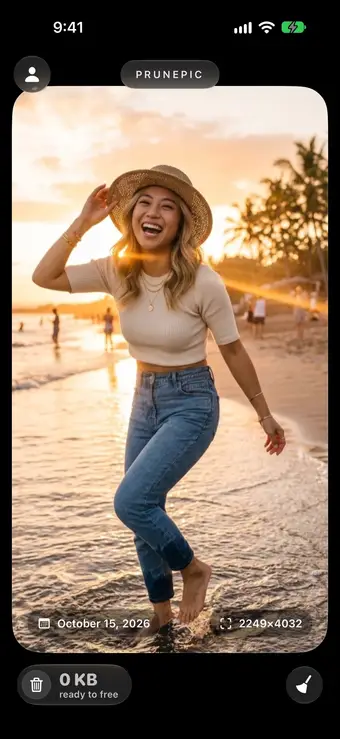
Two details on every card
Each card in the feed shows two details in its bottom corners, so you can decide without opening anything:
- Photos and screenshots: the date the photo was taken at the bottom left and its file size at the bottom right.
- Videos: the length at the bottom left and the file size at the bottom right.
That covers the questions behind most decisions: is this the old one, and is it worth the space? The details fade away while you zoom in on a photo, so they never hide what you are checking.
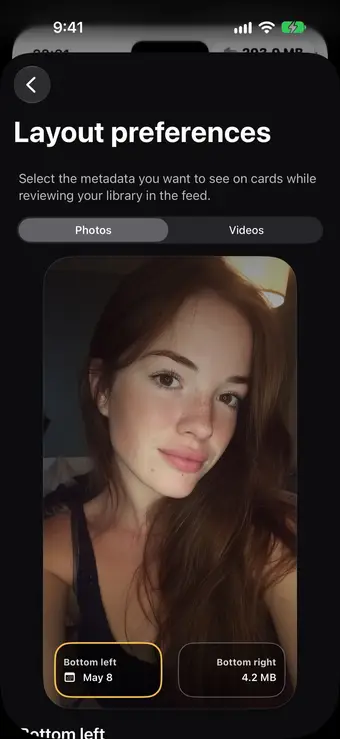
Pick a corner, then pick its detail
Tap the round person button at the top left of the feed, tap the gear, then Asset card metadata under Layout preferences.
Choose Photos or Videos at the top, then tap the Bottom left or Bottom right corner of the preview card. The list below sets that corner, and the preview changes as you tap.
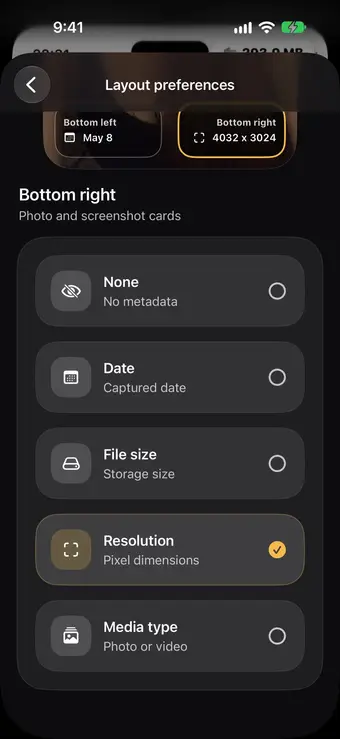
Five details for photos, six for videos
Each corner can show:
| Option | What it shows | Example |
|---|---|---|
| Date | The date the photo or video was taken | October 15, 2026 |
| File size | The space the item takes in your library | 4.2 MB |
| Resolution | The width and height in pixels | 4032×3024 |
| Media type | Whether it is a photo or a video | Photo |
| Duration | The length, on video cards only | 11:52 |
| None | Nothing, for a cleaner card |
Resolution helps you tell an original from a smaller copy saved from a chat app. Media type helps in Everything mode, where photos and videos are mixed.
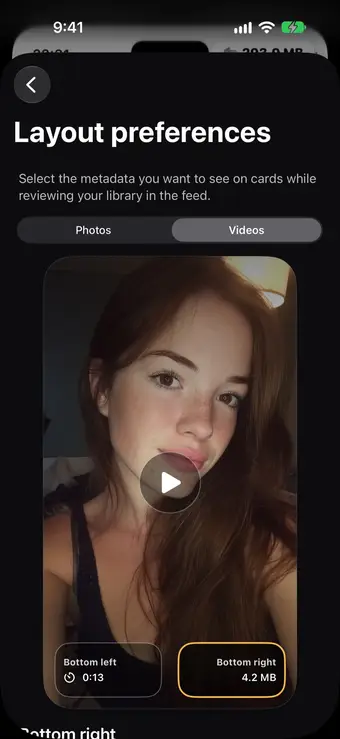
Separate settings for videos
Video cards have their own two corners, set apart from photos. Out of the box they show the length and the file size, the two numbers that matter most when you clear long videos.
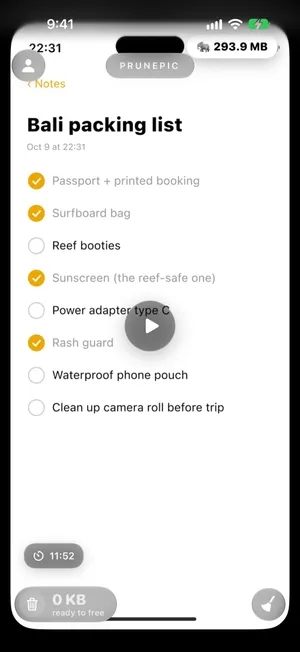
Anything of 50 MB or more also gets a large-file badge at the top right, with an elephant and its size, and the size moves into that badge. A forgotten 12-minute screen recording cannot hide.
The size on the card, and the space you get back
File size adds up every file Photos stores for the item: the photo or video itself, plus the short video of a Live Photo or an edited version when there is one. While PrunePic reads it, the corner says Sizing… for a moment.
The space comes back once you delete the item. Swiping left only queues it in the PrunePic Trash, where the counter adds up what you will free. After you tap Delete All, iOS keeps the items in Recently Deleted for 30 days, still using space, unless you delete them there too. If you use iCloud Photos with Optimize Storage, your iPhone may keep a smaller copy of older photos, so the space freed on the iPhone can be less than the card shows.
What the card details do not change
The details are only what you see. They do not change the order of the feed:
- The feed follows the order of the cleaning mode you chose: newest or oldest first, or Longest first in Videos mode.
- There is no sort by file size. To find heavy videos, sort by length and watch the size on each card, as in how to find large videos on iPhone.
- The date is the one Photos has for the item. If a photo shows the wrong date, fix it in the Photos app, as explained in how to sort iPhone photos by date.
The setting is free, and it stays on your iPhone with the rest of PrunePic’s preferences. Your photos never leave your device.
Frequently asked questions
How can I see a photo's file size while I review my iPhone photos?
In PrunePic it is on by default: every photo, screenshot and video card shows its file size in the bottom right corner. In the Photos app you have to open each photo and swipe up to see its size in the details.
Can I change what the cards show?
Yes. Tap the person button at the top left of the feed, tap the gear, then Asset card metadata under Layout preferences. Choose Photos or Videos, tap the bottom left or bottom right corner of the preview, and pick Date, File size, Resolution, Media type or None. Video cards can also show Duration.
Can PrunePic sort photos by file size?
No. The card details only change what you see, not the order of the feed. Your library comes up by date, and in Videos mode you can sort by length with Longest first. The file size on each card lets you spot the heavy items as they come.
Why does a card say Sizing…?
PrunePic reads the size Photos has recorded for each item, which takes a moment the first time, especially for long videos. The size replaces Sizing… as soon as it is known.
Why did the file size move to the top of a video card?
Anything of 50 MB or more gets a large-file badge with an elephant at the top right of the card, and the size moves into that badge so heavy files stand out. Smaller items show their size in the corner you chose.
Is the file size the space I will get back?
It is the size of every file Photos stores for that item, such as the short video of a Live Photo or an edited version. You get that space back once the item has left Recently Deleted. With Optimize Storage on, your iPhone may keep a smaller copy, so the space freed on the iPhone itself can be less.
Do the settings for photos also change video cards?
No. Photo and screenshot cards share one setting, and video cards have their own. By default photos show the date and file size, and videos show the length and file size.
Is this setting part of PrunePic Pro?
No. Asset card metadata is in Settings for everyone, on the free plan too.
Keep reading
- FeaturesSwipe to delete photos, one at a timePrunePic shows your iPhone photos and videos one at a time. Swipe left to delete, up to keep, right to favorite. Nothing is gone until you empty the trash.
- FeaturesReview long videos and delete the ones you no longer needPrunePic's video cleaner for iPhone puts your longest clips first, shows each one's length and file size, and lets you watch it full screen before you swipe.
- FeaturesClean up old screenshots without losing the ones you needPrunePic's screenshot cleaner shows only your iPhone screenshots, one at a time. Swipe away the clutter and keep the tickets and receipts you still need.
 GuidesSort iPhone videos by size? How to find the biggest onesThe Photos app cannot sort videos by size. Here is how to find the biggest ones anyway: the Videos collection, the info panel, a shortcut and Files. iOS 27.
 GuidesHow to sort iPhone photos by dateSort your iPhone library by the date photos were taken or added, browse by year and month, and fix photos that show the wrong date. Tested on iOS 27.