
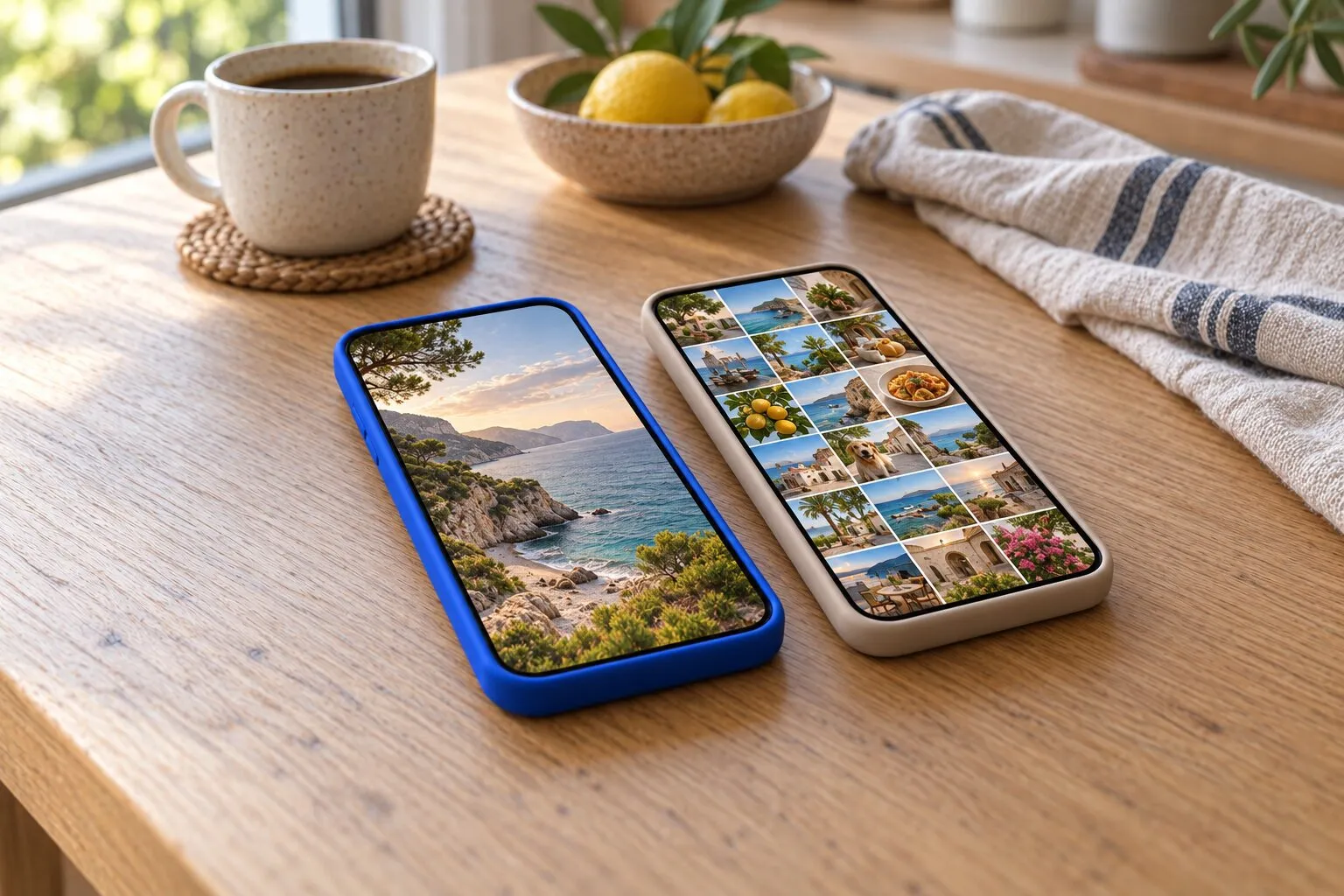
PrunePic vs Slidebox
Both apps sort your camera roll one photo at a time and file the photos you keep into real Photos albums. Slidebox is the one with a lifetime purchase, more than ten years on the App Store, iPad, Mac, Apple Vision and Android versions and 15 languages; its free version shows ads, and its users report that older photos need the paid unlock. PrunePic has no ads, a free plan of 10 decisions a day on any photo, a trash that shows how much space is waiting before you delete, and needs iOS 26 on iPhone.
| Feature | PrunePic | Slidebox |
|---|---|---|
| How you swipe | Left to delete, up to keep, right to favorite or file into an album | Up to trash, down to favorite, tap an album button to file the photo |
| When photos are deleted | When you empty the PrunePic Trash, whenever you choose; iOS asks you to confirm, then Recently Deleted for 30 days | When you delete the photos waiting in its trash; until then nothing changes in Photos, then Recently Deleted for 30 days |
| Undo | Undo the last swipe; Put Back anything from the trash | Undo Actions listed on its App Store page; recover photos from its trash |
| File into albums while you swipe | Yes: three pinned albums in the swipe tray, any album, or a new one; each save counts as one of the day's decisions on the free plan | Yes: one tap on an album button; a Slidebox album can create a matching album in Photos |
| Favorites | Swipe right onto Favorites | Swipe down to mark a favorite |
| Free version | 10 decisions a day on any photo in your library, with the trash, Undo, Favorites and widgets | Free to download, with ads; its App Store page says its subscriptions have no free trial |
| Ads | None | Yes: its App Store page lists it as containing advertising |
| In-app purchases on the US App Store | PrunePic Pro (listed as PrunePic Premium), weekly or yearly: $4.99, $29.99 and $49.99 listed | Weekly $1.99 or $2.99, yearly $19.99 or $29.99, lifetime $29.99 or $49.99; the description also names a $4.99 monthly and a $49.99 annual plan |
| Lifetime purchase | No | Yes, two Lifetime items listed |
| Duplicates | No duplicate finder | Compare Similar Photos: you swipe between similar photos and choose; no automatic detection is claimed |
| Extras | On This Day, Trips & Moments, widgets, cleanup insights | Album folders, library stats, Live Photos, photo editing |
| Devices | iPhone with iOS 26 or later, Mac with Apple silicon, Apple Vision | iPhone and iPad with iOS 15 or later, Mac with Apple silicon, Apple Vision; also Android |
| App size | 33.5 MB | 47.5 MB |
Slidebox is the app closest to PrunePic in spirit: one photo at a time, a swipe to trash, and the photos you keep filed into albums as you go. It has been on the App Store since 2015 and carries an Editors’ Choice badge. The two differ in the gestures, in how the free version is limited, in what you pay, and in the details around deletion.
We make PrunePic, so read this with that in mind. We did not install Slidebox for this page: everything about it comes from its App Store page, its website and FAQ, its privacy policy, and 505 recent App Store reviews. Checked on October 26, 2026.
The short version
- Pick Slidebox if you want to pay once and keep it, if you organize into album folders, or if you use an iPad, a Mac, an Android phone or an iPhone that cannot run iOS 26.
- Pick PrunePic if you want an app without ads, a free plan that works on every photo in your library, each clip’s length and size on the card, and a trash that tells you how much space you are about to get back.
How each app cleans
Slidebox opens on your unsorted photos, by month and year, and shows one at a time. Swipe up to trash it, swipe down to mark it as a favorite, or tap one of the album buttons under the photo to file it there. A photo you leave alone stays unsorted, and since February 2026 a Keep option marks photos you simply want to leave in place. Its App Store page lists Undo Actions, its release notes bring back On This Day and monthly counts, and reviewers also describe a Random batch and screenshot and video views as other ways in.
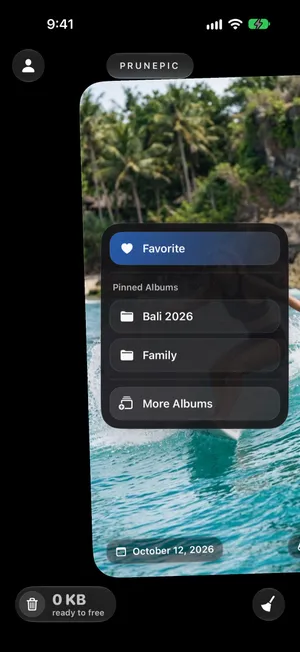
PrunePic shows your library one photo or video at a time, full screen. Swipe left to send it to the PrunePic Trash, up to keep it, right to add it to Favorites or drop it on an album. Cleaning modes focus the feed on screenshots, on videos sorted longest first, on a single trip or on today’s date in past years; Everything and Random are free, the focused modes need PrunePic Pro.
Filing into albums
This is what Slidebox is known for, and reviewers say so: in 300 App Store reviews rated 4 or 5 stars between December 2024 and October 2026, about 30% praise the album organizing, second only to how easy and fun the app is. You tap an album button under each photo, and according to its FAQ, an album created in Slidebox can create a matching album in Photos, so your filing shows up in the Photos app and on your other devices. Albums can be grouped into folders, and you choose which albums show as buttons.
PrunePic files with the same swipe that keeps the photo: drag right, and the swipe tray shows Favorites and up to three pinned albums. Drag further for any album, or create a new one. The photo lands in a regular Photos album, so album filing works alongside the Photos app, not instead of it. Filing works on the free plan too; each save counts as one of the day’s 10 decisions. Our guide to organizing photos on iPhone covers albums and folders in Photos itself, which both apps build on.
When your photos are actually deleted
In both apps, trashing a photo is a mark, not a deletion. Nothing leaves your library until a second step, and after that step iOS keeps the photos in Recently Deleted for 30 days.
- Slidebox keeps trashed photos in its own trash. Its FAQ answers “What happens when I trash a photo?” with “Nothing”: the photo is only hidden inside Slidebox until you open the trash and delete, and from there the photos are removed from your library on every device and recoverable for 30 days. Slidebox’s release notes list fixes to the trash’s delete step in November 2025, December 2025 and June 2026.
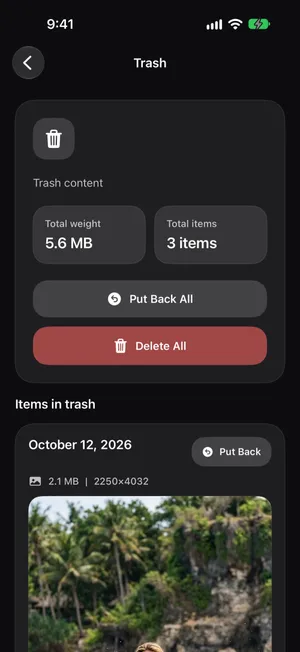
- PrunePic collects everything you swipe left in the PrunePic Trash, across sessions and modes, with a counter of how many items are waiting and how much space they take. You empty it when you choose. Put Back returns anything, Undo reverses your last swipe, and when you tap Delete All, iOS asks you to confirm and moves the items to Recently Deleted.
If your storage figure does not move after either app, that is Recently Deleted holding the space. iPhone storage full shows how to empty it, and how to recover deleted photos covers the 30-day window and its one exception.
Free version, ads and pricing
Slidebox’s free version is free to download and shows ads; its App Store page lists it as containing advertising. Its developer does not document a limit, but its users do: in reviews since September 2025, people describe sorting the most recent year of photos for free and paying to go back further. Some reviewers also describe an ad every few photos. Its App Store page says its subscriptions have no free trial.
On October 26, 2026, Slidebox’s US App Store page listed eight in-app purchases: Slidebox 1 Week at $1.99 and 1 week at $2.99, Slidebox 1 Year at $19.99 and 1 year at $29.99, two items named Slidebox (Lifetime) at $29.99 and $49.99, and two items named Slidebox at $4.99 and $49.99, which match the monthly and annual subscriptions its description names. The description also says you can “unlock the full version of Slidebox permanently” with a one-time purchase. Family Sharing is listed as supported.
PrunePic’s free plan gives you 10 decisions a day in the Everything and Random modes, on any photo in your library, with the trash, Undo, Favorites and widgets included, and no ads. Every keep, delete, favorite or file counts as one decision, and the count starts again at midnight. PrunePic Pro, weekly or yearly, removes the daily limit and unlocks the Photos, Screenshots, Videos, On This Day and Trips & Moments modes, and the longer insight periods. Its US App Store page lists in-app purchases at $4.99, $29.99 and $49.99. There is no lifetime option.
Privacy and what leaves your phone
The App Store privacy labels, as each developer declares them, on October 26, 2026:
| Slidebox | PrunePic | |
|---|---|---|
| Data used to track you | None | Identifiers |
| Data linked to you | None | None |
| Data not linked to you | User content, usage data, diagnostics | Identifiers |
Slidebox’s FAQ says it displays your photos on your device only. Its privacy policy, last updated August 24, 2024, says content from your photo library may be uploaded to the company’s servers or a service provider’s servers, names Google Analytics, Firebase, Mixpanel, AdMob and AdSense, and predates the retirement of its optional cloud backup, which its release notes date to February 1, 2026. Whether anything leaves the device today is something only the developer can say.
PrunePic reads your photos through Apple’s Photos framework, works on them on your iPhone, and never uploads them. It records how the app is used, with Firebase Analytics and Mixpanel, and measures which ads bring people to it with the Meta SDK; those events never include your photos. The privacy policy lists them.
What Slidebox reviewers mention
These are customers’ reports, not tests of ours. In 205 App Store reviews rated 1 to 3 stars between October 2024 and October 2026, from ten countries:
- Bugs and crashes come up in about 28%. The most common single report, in about 11% of these reviews, is the delete step in the trash not completing; Slidebox’s release notes list fixes three times, most recently in June 2026.
- Removed features come up in about 23%, almost all from a redesign in the spring of 2025. Multi-select, progress tracking, On This Day and monthly counts came back in later releases, so those complaints describe the past. Alphabetical album sorting and album search were still being asked for in 2026.
- Ads come up in about 20%, steady across versions.
- Paying comes up more recently: about 8% mention the limit on older photos and 7% a paywall straight away, a share that rises to 15% in the reviews from the last six months.
- Lost progress comes up in about 9%, mostly in the same spring 2025 period.
In 300 reviews rated 4 or 5 stars between December 2024 and October 2026, people praise how easy and fun it is (about 38%), the album organizing (30%), the value, often the one-time purchase (20%), the speed (16%) and the space they got back (14%).
Where Slidebox is better
- Pay once. Two Lifetime purchases are listed. PrunePic Pro is a subscription.
- More devices. iPhone and iPad with iOS 15 or later, Macs with Apple silicon, Apple Vision and Android. PrunePic needs iOS 26 on iPhone, and runs on Macs with Apple silicon and on Apple Vision, but has no iPad or Android version.
- More languages. Slidebox’s App Store page lists 15.
- Folders. Slidebox groups albums into folders inside the app and lets you choose which albums appear as buttons. PrunePic pins three albums and offers the rest in a list.
- Library stats. The Editors’ Choice note mentions your total number of photos and the share of your library that is organized into albums.
- A long track record. On the App Store since 2015, with an Editors’ Choice badge and about 17,000 US ratings averaging 4.8.
The bottom line
If you want to pay once, work on an iPad or Mac, or build a careful album hierarchy, Slidebox has the longer feature list and the lifetime price. If ads and a paywall on your older photos put you off, or you want each clip’s size on the card and a trash that shows what you are about to free, PrunePic is built for that. Both are free to try, and the camera roll cleanup guide works with either.
Frequently asked questions
Is PrunePic a free Slidebox alternative?
PrunePic is free to download and gives you 10 decisions a day with no ads, on any photo in your library, old or new; every photo you keep, delete, favorite or file counts as one. PrunePic Pro removes the limit and unlocks the focused modes. Slidebox is also free to download, with ads in the free version, and its users report that photos older than about a year need the paid unlock.
Does Slidebox have ads?
Yes, in the free version: its App Store page lists it as containing advertising, and its privacy policy names Google AdMob. Reviewers say the paid version removes them. PrunePic has no ads, on the free plan or with Pro.
How much does Slidebox cost?
On October 26, 2026, Slidebox's US App Store page listed weekly plans at $1.99 and $2.99, yearly plans at $19.99 and $29.99 and two Lifetime purchases at $29.99 and $49.99; its description names a $4.99 monthly and a $49.99 annual subscription and says there are no free trials. Which price you see depends on the offer the app shows you, so check it before you buy.
Is Slidebox a one-time purchase?
It can be. Its App Store page lists two Lifetime items, at $29.99 and $49.99 on October 26, 2026, next to weekly and yearly subscriptions. PrunePic Pro is a weekly or yearly subscription with no lifetime option.
Why are my photos still in my library after trashing them in Slidebox?
Because trashing in Slidebox only marks a photo inside the app, as its FAQ explains: nothing changes in Photos until you delete the photos from Slidebox's trash. After that they sit in Recently Deleted for 30 days. PrunePic works the same way: swiped photos wait in the PrunePic Trash until you empty it, then iOS asks you to confirm and moves them to Recently Deleted.
Does Slidebox find duplicate photos?
Not automatically. Its App Store page describes Compare Similar Photos as swiping between similar photos to decide which ones to keep, which you do yourself. PrunePic has no duplicate finder either; the Photos app's Duplicates album catches exact copies, as our duplicates guide explains.
Which swipe deletes in Slidebox and in PrunePic?
Up in Slidebox, left in PrunePic. Slidebox marks a favorite with a swipe down and files a photo with a tap on an album button. PrunePic keeps with a swipe up and favorites or files with a swipe right.
Keep reading
- FeaturesSort photos into albums while you swipePrunePic is a photo organizer for iPhone that files keepers as you clean: swipe right, drop the photo on a pinned album, or search your albums or create a new one.
- FeaturesUndo any swipe before a photo is deletedPrunePic never deletes a photo when you swipe. Undo it, swipe back or Put Back from the PrunePic Trash, then delete the rest in one batch you confirm in iOS.
- FeaturesSwipe to delete photos, one at a timePrunePic shows your iPhone photos and videos one at a time. Swipe left to delete, up to keep, right to favorite. Nothing is gone until you empty the trash.
 ComparePrunePic vs SwipewipeSwipewipe and PrunePic both clean up iPhone photos with a swipe. Compare free limits, ads, what happens before deletion, albums, pricing and privacy.
 ComparePrunePic vs Apple PhotosWhen the iPhone's Photos app is enough to clean up your library, and when a swipe app like PrunePic saves time. An honest comparison, tested on iOS 27.
 GuidesHow to organize photos on iPhoneOrganize iPhone photos with albums and folders without creating duplicates, see what Photos already sorts for you, and file a big library in short sessions.