
PrunePic vs Clever Cleaner
PrunePic is a Clever Cleaner alternative for people who want to judge every photo themselves rather than have a scanner group and compress them. Clever Cleaner groups duplicate and similar photos with a Best Shot, lists videos by size, compresses media and offers unlimited free swiping, with its other tools under a free daily limit. PrunePic is a swipe app: you see each photo or video once and decide, nothing is compressed or preselected, and what you delete waits in a trash until you empty it.
| Feature | PrunePic | Clever Cleaner |
|---|---|---|
| How you clean | One photo or video at a time: left to the PrunePic Trash, up to keep, right to favorite or save into an album | A scan sorts media into tools (similar photos, videos, screenshots, Live Photos, Compress, Smart Cleanup), plus Swipe: left to delete, right to keep |
| Before anything is deleted | Items wait in the PrunePic Trash until you empty it; iOS asks you to confirm, then Recently Deleted | You confirm in the app; deleted media goes to Recently Deleted in Photos |
| Duplicates and similar photos | Duplicates, with PrunePic Pro: scans a period you pick, such as the last 14 days or one trip, groups identical, near-identical and similar photos side by side, and suggests a keeper when one clearly stands out | Groups duplicate and similar photos and marks a Best Shot |
| Compression | None: photos and videos are never rewritten | Compresses photos, videos, screenshots and Live Photos; converts Live Photos to stills |
| One-tap cleanup | No | Smart Cleanup: removes similar photos except the Best Shot, compresses screenshots, removes the live part of Live Photos |
| Free version | Up to 100 photos a day to the trash; keeps and Favorites unlimited | Swipe with no daily limit; the other tools within free daily limits shown in the app |
| Ads | None while you clean; one optional short ad, only to go past the free 100 a day | None |
| Paid options (US App Store) | PrunePic Pro: $29.99 a year with a 7-day free trial, $4.99 a month or $49.99 once | Weekly with a 3-day trial at $6.99; Lifetime at $39.99 |
| Devices | iPhone and iPad with iOS 26 or iPadOS 26 or later | iPhone with iOS 16 or later, Mac with Apple silicon, Apple Vision |
| Languages | English, French, German, Spanish, Italian | More than 20, including those five |
| App size | 39.7 MB | 123.2 MB |
Clever Cleaner and PrunePic both free up space taken by photos, both are free to download, and neither shows ads while you clean; PrunePic’s only ad is an optional one past its free 100 photos a day. They work in opposite ways. Clever Cleaner scans your library and hands you groups to clear in bulk, with a swipe mode on the side. PrunePic is only the swipe: every photo, one at a time, and nothing deleted until you empty its trash.
We make PrunePic, so read this with that in mind. We did not install Clever Cleaner for this page: everything about it comes from its App Store page (re-read on November 2, 2026), CleverFiles’ website, FAQ, terms and privacy policy, and 461 recent App Store reviews.
The short version
- Pick Clever Cleaner if duplicates, bursts and near-identical shots are what fill your iPhone, if you want to shrink videos and Live Photos instead of deleting them, or if you want a cheaper one-time purchase or an app that runs on iOS 16.
- Pick PrunePic if you want to look at every photo yourself, with nothing preselected or compressed, the photos you keep marked as favorites or saved to albums in the same swipe, and every deletion waiting in a trash you check first.
Before either, try what is free in the Photos app: the Duplicates album merges exact copies, and the Apple Photos comparison shows what else the built-in app does and where it stops.
How each app cleans
Clever Cleaner starts with a scan. Its App Store page describes the tools it fills: similar and duplicate photos, grouped with a Best Shot marked in each group; videos sorted from largest to smallest; screenshots sorted by newest, oldest or largest; Live Photos you can turn into still images; and compression for photos, videos, screenshots and Live Photos. Smart Cleanup runs up to three of these in one tap: it removes similar photos except the Best Shot, compresses screenshots and removes the live part from Live Photos. Swipe shows photos, videos, screenshots and Live Photos one by one: left to delete, right to keep. A Skip List keeps chosen items out of every cleanup.
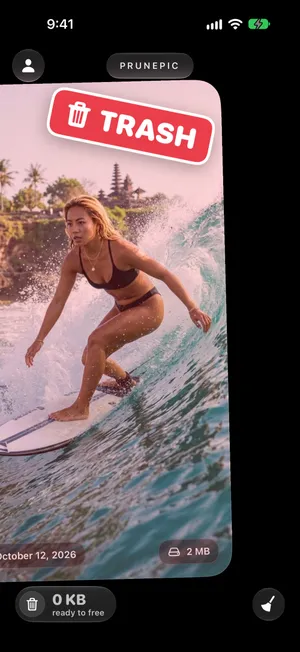
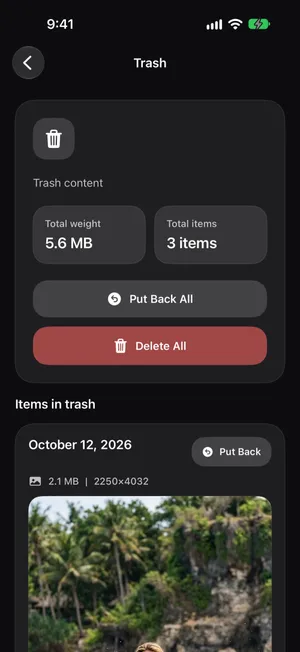
PrunePic shows your library one photo or video at a time, full screen. Swipe left to send it to the PrunePic Trash, up to keep it, right to add it to Favorites or save it into an album. Cleaning modes narrow the feed to screenshots, videos sorted longest first, a trip or today’s date in past years, and a photo you reviewed never comes back in any mode. Nothing is selected for you: you make every decision. With Pro, the modes also include Duplicates: it scans a period you pick, such as the last 14 days or one trip, on your iPhone, groups photos that look alike, and suggests one to keep only when it is clearly sharper or the faces clearly better.
Deleting, compressing and getting photos back
In both apps, deleted photos end up in Recently Deleted in Photos, where they stay for 30 days, unless your iCloud storage is over its limit, in which case iOS removes deleted items at once. What happens before that differs.
- Clever Cleaner preselects. In a group of similar photos, everything except the Best Shot is selected for you; you check it, tap Delete and confirm. Smart Cleanup works on the whole library in one go. CleverFiles’ FAQ tells users to clear Recently Deleted afterwards to get the space back. Reviewers of earlier versions describe Swipe collecting left-swiped photos in a list you empty at the end, with an undo button; CleverFiles does not document either.
- Compression rewrites files. CleverFiles’ terms say compression creates new files and removes the originals only after you confirm, and that it is lossy: screenshots saved as PNG may become HEIC. That is how compression saves space, and why a compressed photo is not the original file.
- PrunePic never preselects and never rewrites. Everything you swipe left collects in the PrunePic Trash, across sessions and modes, with the number of items and the space they take. Put Back returns anything, and Undo, right after a swipe, brings the photo straight back; when you empty the trash, iOS asks you to confirm.
If your storage did not change after a cleanup in either app, iPhone storage full explains Recently Deleted and iCloud, and how to recover deleted photos covers getting one back.
Free version and pricing
Clever Cleaner was free, with no in-app purchases, from its launch in February 2025 until version 3.0 on August 17, 2026. Since then, its App Store page says Swipe has no daily limit and the other tools come with free daily limits. CleverFiles does not publish the allowance: its terms say it is shown in the app and may change, and that people who used earlier versions may keep unlimited use, as the 3.0 release note promised. Reviewers most often report 1 GB a day. On November 2, 2026, the US App Store listed two purchases: Clever Cleaner Weekly with Trial at $6.99 and Clever Cleaner Lifetime at $39.99. Its description also mentions a yearly plan, which does not appear in the US list. CleverFiles’ terms say refunds go through Apple.
PrunePic lets you send up to 100 photos a day to the trash in the Everything mode, with Undo and Favorites included; only photos you send to the trash count, so keeping and favoriting are unlimited. Once you reach 100, you can watch a short optional ad to add 40 more for the day; no other ad appears in the app. PrunePic Pro removes the limit and unlocks the other modes, such as Screenshots, Videos and Random. In the US it costs $29.99 a year with a 7-day free trial, $4.99 a month or $49.99 once.
So the free versions are limited in different places: Clever Cleaner’s swipe is unlimited and its scanner tools are capped by volume; PrunePic is capped by the number of photos you send to the trash.
Privacy and what leaves your phone
The App Store privacy labels, as each developer declares them, on November 2, 2026:
| Clever Cleaner | PrunePic | |
|---|---|---|
| Data used to track you | Identifiers | Identifiers |
| Data linked to you | Identifiers, usage data | None |
| Data not linked to you | Purchases, diagnostics | Identifiers |
Clever Cleaner’s App Store page says everything is processed locally and your photos and videos stay on your device, and its terms say CleverFiles does not receive copies of them. Its privacy policy, dated November 22, 2024, before the paid plans, says no personal information is collected and does not mention the tracking its label declares.
PrunePic reads your photos through Apple’s Photos framework, works on them on your iPhone and never uploads them. It records how the app is used, with Firebase Analytics and Mixpanel, and measures which ads bring people to it with the Meta SDK; those events never include your photos. The privacy policy lists them.
What Clever Cleaner reviewers mention
These are customers’ reports, not tests of ours. Clever Cleaner has few critical reviews: in 161 App Store reviews rated 1 to 3 stars between March 2025 and October 2026, from 11 countries, about 3.5% of the 4,659 we read from that period, the recurring themes are these:
- Money arrived with version 3.0. In the 99 App Store reviews rated 1 to 3 stars between August 17 and October 21, 2026, about 31% mention money, mostly people who expected the app to be free, some after an outside ad promised it was; before 3.0, almost none did.
- Compression side effects: in those 161 reviews, about 5% mention a library that grew instead of shrinking, a camera roll in a different order, or photos removed that were not screenshots.
- Deletions that did not apply: in those 161 reviews, about 6% mention Delete pressed and the photos still there, across versions 2.1 to 3.5.
- The 3.0 redesign drew complaints from long-time users about preselection, groups they could no longer delete one by one and the month view they lost.
In 300 reviews rated 4 or 5 stars, from October 10 to 22, 2026, people praise how easy it is (about 30%), that it is free (24%), how fast it is (13%) and how well its Best Shot picks the keeper (7%).
Where Clever Cleaner is better
- Duplicates across the whole library. Grouping with a Best Shot in one scan of your entire library is the fastest way through years of bursts and near-identical shots. PrunePic’s Duplicates, part of Pro, scans one period at a time; our duplicates guide also shows Apple’s free way.
- Compression. It can shrink videos, photos and screenshots you want to keep, and turn Live Photos into stills. PrunePic only deletes.
- Unlimited free swiping. Its Swipe has no daily limit; PrunePic’s free plan stops at 100 photos a day to the trash, plus 40 more for each optional ad you watch.
- A cheaper one-time purchase: Lifetime at $39.99 on the US App Store, where paying once for PrunePic Pro costs $49.99.
- Older iPhones and more languages. It needs iOS 16; PrunePic needs iOS 26. Its App Store page lists more than 20 languages; PrunePic’s app is in five.
- Scale. About 84,500 US ratings averaging 4.8, from the makers of the Disk Drill recovery app.
The bottom line
If duplicates and bursts are your problem, or you would rather compress than delete, Clever Cleaner does what PrunePic does not. If you want to see every photo before it goes, keep favorites and albums tidy as you swipe, and have deletions wait in a trash you control, PrunePic is built for that. Both are free to try, and the clean-up guide and the best photo cleaner apps roundup work with either.
Frequently asked questions
Is PrunePic a good Clever Cleaner alternative?
It depends on what fills your library. If it is bursts, near-identical shots and duplicates, Clever Cleaner's grouping with a Best Shot across the whole library is faster; PrunePic's Duplicates, part of Pro, scans one period at a time. If it is years of photos you want to judge one by one, PrunePic shows each photo once, keeps what you delete in a trash you check, and never compresses or rewrites anything.
Is Clever Cleaner free?
Partly. Its App Store page says Swipe has no daily limit and that the other tools come with free daily limits; the app shows the allowance, and CleverFiles' terms let it change. Since version 3.0 on August 17, 2026, Premium removes the limits: on November 2, 2026, the US App Store listed a weekly plan with a 3-day trial at $6.99 and a lifetime purchase at $39.99. Before 3.0, the app was free with no in-app purchases.
Is PrunePic free?
PrunePic is free to download and lets you send up to 100 photos a day to the trash in the Everything mode; keeping a photo or adding it to Favorites never counts. Past 100, you can watch a short optional ad to add 40 more for the day. PrunePic Pro removes the limit and unlocks the other modes, such as Screenshots, Videos and Random. In the US it costs $29.99 a year with a 7-day free trial, $4.99 a month or $49.99 once.
Does Clever Cleaner upload my photos?
Not according to CleverFiles. Its App Store page says everything is processed locally and your photos and videos stay on your device. Its privacy label still declares identifiers used to track you, for its own advertising or marketing. PrunePic also processes photos on your iPhone and never uploads them, and its label also declares identifiers used for tracking.
Do I need either app to delete duplicate photos?
Not for exact duplicates. The Photos app's Duplicates album, under Utilities in Collections, finds identical copies and merges them for free. Clever Cleaner adds similar photos, such as a burst of the same pose, and so does PrunePic Pro's Duplicates mode. Our duplicate photos guide covers Apple's way first.
Keep reading
- FeaturesSwipe to delete photos, one at a timePrunePic shows your iPhone photos and videos one at a time. Swipe left to delete, up to keep, right to favorite. Nothing is gone until you empty the trash.
- FeaturesUndo any swipe before a photo is deletedPrunePic never deletes a photo when you swipe. Undo it, swipe back or Put Back from the PrunePic Trash, then delete the rest in one batch you confirm in iOS.
- FeaturesPhoto cleanup modes for screenshots, videos and tripsClean your iPhone camera roll by category: screenshots, videos longest first, a batch, a trip or today's memories. Photos you reviewed stay out of every mode.
 ComparePrunePic vs Apple PhotosWhen the iPhone's Photos app is enough to clean up your library, and when a swipe app like PrunePic saves time. An honest comparison, tested on iOS 27.
 GuidesHow to delete duplicate photos on iPhoneMerge duplicates with the built-in Duplicates collection in Photos, then deal with the near-identical shots it skips. Step-by-step for iOS 27.
 GuidesThe best photo cleaner apps for iPhoneDuplicate scanner or swipe app? Ten iPhone photo cleaners compared on free limits, ads, one-time purchases, album filing and App Store privacy labels.