
My mom's iPhone storage is full
Start with apps, not photos: offload ones your parent doesn't use, then look through Recently Deleted together before emptying it. Before deleting any photos, check that a copy exists somewhere else and whether iCloud Photos is on, because a deletion then reaches their iPad and iCloud too. If you live apart, FaceTime can share their screen, so you can do much of this from your own iPhone.
The phone call goes the same way every time: the iPhone says it’s full, your mom or dad doesn’t know what to delete, and you’re the one who gets asked. The space is usually easy to find. What matters more is that you’re working on someone else’s memories, on a phone that may be syncing to an iPad you can’t see, and they can’t always tell you whether anything is backed up. Here is the order that keeps that safe, written for iOS 27; the steps are the same on iOS 26. We did not test the FaceTime part ourselves: that section follows Apple’s guide.
The quick answer
About 15 minutes, together, in this order:
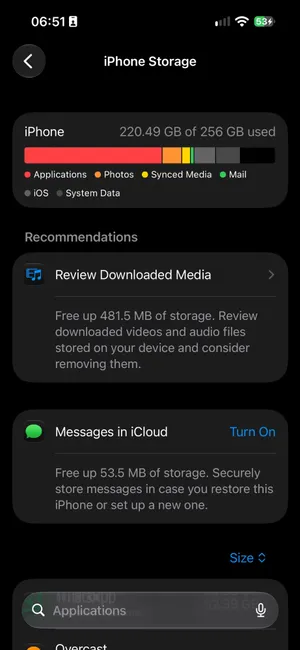
- See what is full. Open Settings, tap General, then iPhone Storage, and wait for the list to load. The bar shows the split between photos, apps and the rest. Apps are sorted by size below it.
- Offload one or two big apps they don’t use. Tap the app, then Offload App. Nothing personal is lost, and no photos are touched. Ask before you offload anything they rely on when they’re out, such as a transit, ticket or banking app.
- Look through Recently Deleted together. In Photos, tap Collections, open Recently Deleted under Utilities, tap View Album and unlock. Everything here is still using space. If your parent recognizes nothing worth keeping, tap Select, then the More button and Delete All. That step can’t be undone.
- Stop here if that was enough. For a few weeks of room it often is. If it wasn’t, go on to the questions below before you touch their photos.
Three questions before you delete any photos
Is there another copy? Ask, then check. iCloud Photos keeps the same library on every device, so it isn’t a backup: a deletion reaches all of them. Apple also advises making a copy of what you want to keep before deleting from iCloud. If this iPhone holds the only copy of their photos, import them to a computer first; Apple’s guide to transferring photos covers Mac and Windows.
Is iCloud Photos on? Look in Settings › [their name] › iCloud › Photos. If Sync this iPhone is on, whatever you delete also leaves iCloud and any iPad or Mac on the same account. Our guide to deleting from the iPhone but not iCloud has the ways around that.
Who decides? A blurry photo of a grandchild can be the one they love, and a screenshot of a recipe may be how they keep recipes. Don’t clear by category because it looks like junk to you. Show them what you’re about to remove, or leave photos alone and clear the rest.
Why a parent’s iPhone fills up
The usual causes are the same as on any iPhone, and our guide to iPhone storage full goes through each. Four are more common when someone doesn’t think about storage:
- Family group chats. Photos from a busy chat are kept in Messages; in iPhone Storage, tap Messages to see the large attachments. WhatsApp can keep them twice: once in the chat and again in Photos. WhatsApp photos filling your iPhone shows how to clear both and turn off the setting.
- Videos taken by accident. A pocket recording of 20 minutes is a large file that nobody wants. Finding large videos shows how to spot them.
- A full iCloud as well. When iCloud is full, backups and photo uploads stop, and the alerts look a lot like the iPhone’s own. If it’s the iCloud message they’re seeing, iCloud storage full is the right guide, and clearing the iPhone won’t fix it.
- Recently Deleted, which they’ve never heard of. They deleted photos last week to fix this, nothing changed, and they gave up. Those photos are still there, still using space.
Doing it from your own iPhone
You don’t have to wait for the next visit. Apple lets you ask to see someone’s screen from a one-to-one Messages conversation, and on the FaceTime call that starts you can request remote control. Your parent taps Allow, and you can tap and swipe on their screen. Apple’s pages say what to expect:
- Remote control needs iOS 18 or later on both iPhones, and you have to be saved in their contacts. Apple says it isn’t available in the EU. Without it, screen sharing still lets you see their screen and talk them through it.
- They stay in charge. Their touches take priority over yours, and they can tap Stop at any time. Ending the call ends it too.
- Some things will need them. Apple says Face ID and Touch ID are turned off during the session, and that you may be restricted from changing Apple Account or Face ID settings. Expect to ask for help at the Recently Deleted lock.
- Only from someone they trust. Apple warns that whoever has control can delete items and send messages. Tell your parent to treat any other request like this as a scam, even from someone who says they’re from Apple.
What it costs if nobody deals with it
A missed photo of the grandchildren is the obvious cost, since the Camera stops saving when the iPhone is full. The quieter one is on the iCloud side: if iCloud has been full for months, the iPhone hasn’t been backing up, and nobody has noticed. That’s worth five minutes on its own, under Settings › [their name] › iCloud.
One more check while you’re there: Settings › [their name] › Subscriptions. People who are told their phone is full sometimes install the first cleaner app they find. If there’s a weekly plan they didn’t intend to keep, Apple’s Cancel a subscription page shows how to stop it. Deleting the app doesn’t.
How to keep it from coming back
- Optimize Storage, if iCloud Photos is on and the plan has room. In Settings › [their name] › iCloud › Photos, tap iPhone Storage and choose Optimize Storage (on iOS 26, it’s right on the Photos screen), and the iPhone keeps smaller versions as space runs low, as Apple explains on its iCloud Photos page.
- A shared iCloud plan, if the 5 GB free plan is the problem. Any iCloud+ plan can be shared through Family Sharing, so one plan may cover you both, and Apple says each person’s photos and documents stay private. Our iCloud guide covers plans and what else to clear.
- Offload Unused Apps, which removes apps they don’t use when space runs low. It’s in Settings › Apps › App Store, and our guide to freeing up storage has the other long-term settings.
- The WhatsApp setting, if a family group is the cause.
How PrunePic helps
PrunePic is for the part that needs your parent’s own judgment: going through years of photos, which is hard to do in a grid of tiny thumbnails. It needs iOS 26 or later, so check that first; on an older iPhone, stick with the steps above.
It shows one photo or video at a time, full screen, and that makes it easy to do together: swipe left to delete, up to keep, right to favorite. It remembers what was reviewed, so ten minutes on a Sunday adds up.
- Nothing goes straight away. What’s swiped left waits in the PrunePic Trash, which shows how much space the waiting items take. You can look through it together and put anything back. Then iOS asks to confirm, and the items go to Recently Deleted (if iCloud is over its limit, deleted items are removed at once).
- Long videos first. Videos mode, part of PrunePic Pro, shows clips longest first with their size on the card.
The free plan has a daily allowance in the Everything mode, and PrunePic Pro removes it. The photos never leave the iPhone. PrunePic does use analytics and advertising-measurement tools, which its privacy policy lists. It’s our app, so judge it with that in mind; if the built-in steps cleared enough room, your parent doesn’t need it.
Checklist
- Settings › General › iPhone Storage: see what’s full.
- Offload one or two big apps they don’t use, after asking.
- Photos › Collections › Recently Deleted: look through it together, then empty it.
- Settings › [their name] › iCloud: is iCloud full? Is the iPhone still backing up?
- Settings › [their name] › iCloud › Photos: is Sync this iPhone on? Is there a copy elsewhere?
- Settings › [their name] › Subscriptions: anything they didn’t mean to keep?
- Clear chats and long videos next. Delete their photos only when they’ve seen what’s going.
- Turn on Optimize Storage if iCloud has room, and turn off auto-saving in group chats.
Frequently asked questions
What can I safely delete on my mom's iPhone without asking?
Nothing that holds memories. Offloading an app she doesn't use is the safe first step: the app goes, its documents and data stay, and she can tap its icon to get it back while it is still on the App Store. Photos, videos and message threads are hers to decide on, and with iCloud Photos on, a deleted photo disappears from her other devices too.
Can I clean up my parent's iPhone from my own iPhone?
Yes, on a one-to-one FaceTime call, if you are both on iOS 18 or later and you are saved in their contacts. You ask to see their screen, ask for remote control, and they tap Allow. Apple says remote control isn't available in the EU; there, screen sharing still lets you talk them through it. Apple warns that the person in control can delete items and change settings, so they should keep watching. They can tap Stop at any time.
Do I need my parent's passcode to help?
For some steps, or their face. Recently Deleted is locked and opens with Face ID, Touch ID or the passcode, and Apple says Face ID and Touch ID are turned off during a remote control session. The easiest way is to have your parent do the unlocking, or to end remote control for that step and talk them through it.
Should I buy my parent more iCloud storage?
Only if iCloud is what's full. More iCloud storage does not make room on the iPhone by itself. It does let backups and photo uploads run again, and it lets Optimize Storage keep smaller versions on the iPhone over time. Any iCloud+ plan can be shared with up to five other people through Family Sharing, so your parent may be able to join yours.
If I delete photos from my mom's iPhone, are they deleted from her iPad?
Yes, if iCloud Photos is on and both are signed in to the same Apple Account. The deletion reaches iCloud and every device. Recently Deleted keeps the items for 30 days, unless her iCloud storage is over its limit, in which case deleted items are removed at once.
Why is my parent paying for a storage cleaner app?
Check before you assume anything. Open Settings, tap their name, then Subscriptions, to see what renews and when. Weekly plans are common among cleaner apps. Deleting an app does not cancel its subscription, so cancel it there if your parent doesn't want it.
Keep reading
- FeaturesSwipe to delete photos, one at a timePrunePic shows your iPhone photos and videos one at a time. Swipe left to delete, up to keep, right to favorite. Nothing is gone until you empty the trash.
- FeaturesUndo any swipe before a photo is deletedPrunePic never deletes a photo when you swipe. Undo it, swipe back or Put Back from the PrunePic Trash, then delete the rest in one batch you confirm in iOS.
 GuidesiPhone storage full: what to do right nowiPhone storage full and blocking photos or updates? Get space back in minutes, find out why deleting photos did not help, and stop it filling up again.
 GuidesHow to free up storage on iPhoneFind what fills your iPhone in Settings, then clear the biggest items first: videos, Messages attachments, unused apps and Recently Deleted. Steps for iOS 27.
 GuidesiCloud storage full? How to free up spaceSee what fills your iCloud, delete old backups, shrink your photo library and clean Messages and Mail before upgrading. Steps for iPhone with iOS 27.
- ScenariosWhatsApp photos are filling up my iPhoneWhatsApp can keep a photo twice on your iPhone: once in the chat and once in Photos. Here is how to find both copies, clear them and stop new ones piling up.