
Our wedding photos are everywhere and I don't know where to start
Organize wedding photos in three steps: save the originals somewhere safe, gather every guest's photos in one place, then build a single album of the ones you want to keep looking at. Start with the photographer's gallery and a copy outside your iPhone, because iCloud Photos syncs deletions. A Shared Album collects guests' photos, though on iOS 27 a permanent one counts against your iCloud storage. A regular album only points to photos, so it uses no extra space.
A week after the wedding, the photos are in six places. There’s a link from the photographer, a group chat full of blurry dance floor shots, an aunt who says she will send hers, and 800 photos on your own iPhone, some of them saved twice. Most advice on organizing wedding photos is written for photographers with Lightroom catalogs. This page is for the couple, with an iPhone and the Photos app. The steps are for iOS 27, and we point out where iOS 26 differs.
The quick answer
- Save the originals first. Download the photographer’s gallery to a computer or an external drive.
- Gather guests’ photos in one place. An iOS 27 Shared Album works with or without an iPhone.
- Save what you want to your own library, then merge the exact copies.
- Make one album for the best. It costs no extra space, and it’s the one you will actually open.
- Delete last, and only your own clutter. Nothing here needs you to delete a good photo in a hurry.
Why this happens
A wedding produces the same day from many cameras. Each guest has their own favorites, and each channel handles them differently: a chat app may save a compressed copy, a link to the full files can keep the original, and a forwarded photo can arrive with a different date. The same photo reaches you three ways, and the good ones get lost among the copies. Because the photos matter so much, it feels risky to touch any of them, so the mess stays.
Save the originals before you organize
- The photographer’s gallery comes first. Download the full-resolution files to a computer or a drive as soon as you can. Some galleries expire, so check your contract for the date, and for what it says about printing.
- Don’t rely on iCloud Photos as your copy. It keeps your library in sync, so a photo deleted on your iPhone goes from iCloud too. It usually stays in Recently Deleted for 30 days, but Apple can remove deleted items at once if your iCloud storage is over its limit.
- Copy your own photos too. Import them with a cable, using Apple’s guide to transferring photos to a Mac or PC. If you use iCloud Photos, your Mac’s library is synced rather than a separate copy, so copy the files to a drive. For a PC, download the originals to your iPhone first, as the guide explains. Then open a few of the copies, videos included.
- Bring only your favorites to your iPhone. A full gallery can take a lot of space, and the drive already holds it. If your storage is tight, see our guide to freeing up iPhone storage first.
Collect guests’ photos without filling your iCloud
Use a Shared Album. In Collections, scroll to Shared Albums, tap it, tap the add button and name the album. Apple says guests can join through a link on the web, without an Apple device or an Apple Account, which covers the relatives on Android. Tap Sharing Options to share the album with a link, and turn on Make Album Temporary if you want a temporary one. If a guest can’t add photos, check that they have Can Add Photos under Manage Shared Album. Guests whose Apple devices aren’t on the latest software must update or view the album on iCloud.com. For guests who don’t use iCloud, an album created on iOS 26 or earlier offers only a Public Website, which they can view but not add to. Apple says iCloud Photos must be on to use Shared Albums on your iOS 27 devices, except to create a temporary album.
Four things in Apple’s limits for Shared Albums matter for a wedding:
| Shared Album on iOS 27 | Temporary album on iOS 27 | Created on iOS 26 or earlier | |
|---|---|---|---|
| Quality | Full-resolution originals | Apple’s limits page doesn’t say, so check a photo before you rely on it for prints | Photos reduced to 2048 pixels on the long edge, videos to 720p |
| Storage | Uses the owner’s iCloud plan, guests’ additions included | Doesn’t count against your storage | Doesn’t count against your storage |
| How long it lasts | Until you delete it | Deleted after 30 days | Until you delete it |
| Limits | 100 participants, including you | Up to 5,000 items | Up to 5,000 items per album |
So a permanent iOS 27 album gives you the best quality, and it’s also the one that can fill your iCloud plan if 80 guests add their videos. A temporary album avoids that, but put a reminder in your calendar: when it expires, the photos are gone. The same goes for deleting a Shared Album: Apple says that permanently deletes what’s inside. Copies you’ve saved stay.
To save a guest’s photo to your library, tap it, tap the share button, then Save Image or Save Video. Only the people in your household need more than this: if you and your partner want one library for everything, our page on family photos compares a Shared Library with a Shared Album.
Make one album, in the order of the day
Now build what you will actually look at. Open Collections, tap Albums, tap the add button and choose New Album. An album only points to photos, so it adds no copies and takes no extra space.

- One album is enough for most weddings. Tap the sort and filter button in the album and choose oldest to newest, as Apple’s guide shows, so getting ready, the ceremony, dinner and the dancing fall into line. Our guide to organizing photos covers folders, if you held events over several days and want one album per event.
- Fix a wrong date when you see one. A forwarded photo or another camera’s clock can put a shot in the wrong place. Sorting by date shows how to correct it in the photo’s details.
- Use the heart for the very best. Then the album’s filter can show only your favorites, which gives you a short version to show people.
Thin the copies, not the moments
Merge copies first, because that takes little judgment, but open a set and compare when its copies aren’t exact, since it can include a different resolution or a small edit. Collections › Utilities › Duplicates finds them, and Merge keeps the best version. Our duplicates guide explains what it misses, such as shots of the same moment taken seconds apart.
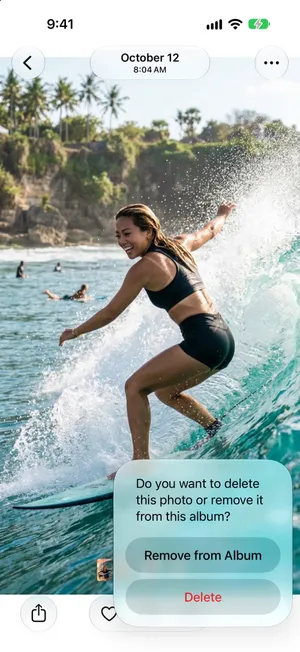
Inside your album, take out a photo with Remove from Album, which keeps it in your library. Read the prompt carefully, because Delete removes it everywhere.
| Keep | Let go |
|---|---|
| At least one photo of each moment and each person who matters | The other near-identical takes of that moment |
| Blurry dance floor shots that capture the mood | Blurry shots of nothing in particular |
| Photos with people who may not be around for the next big event | Screenshots of the seating chart, the menu and the group chat |
| The in-between moments, such as a look before the first dance | A guest’s copy from a chat when you have the original |
Keep the album when you’re done. It’s your shortlist for a photo book, so you can add its photos in your photo book service’s app or website. Check the resolution of anything a guest sent before you print it.
What it costs you if you ignore it
Time is the main cost, because links expire and guests forget. If you wait six months to ask for photos, many will never arrive, and a photographer’s gallery may close. Your iPhone also fills up with copies of a day you rarely open, because you can’t find the good ones. The mistake to avoid is deleting in a rush to free up space, before you’ve made a copy.
How PrunePic helps
PrunePic is our app, and you don’t need it to do any of this. It doesn’t collect guests’ photos or pick the best shot. It helps with the slow part: going through your own photos one at a time, full screen, where a closed eye is easier to see than in a grid. Swipe left to send a photo to the PrunePic Trash, up to keep it, or right to drop it on your wedding album.
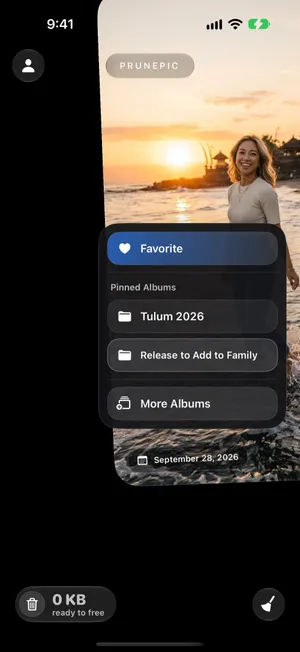
Nothing is deleted on a swipe. A photo waits in the PrunePic Trash until you empty it, iOS asks you to confirm, and it then stays in Recently Deleted for 30 days, except that iCloud over its storage limit removes deleted items at once. PrunePic has no mode for reviewing one album. With PrunePic Pro, Trips & Moments may find the wedding as a trip or a moment from the location saved in your photos, so you can go through only its photos and save the keepers to a new album. It can only find photos that have a location, so guests’ saved images may be missing. The free plan lets you send up to 100 photos a day to the trash, and filing into albums doesn’t count. Your photos never leave your device.
Checklist
- Download the photographer’s gallery to a computer or a drive, and note any expiry date.
- Import your own wedding photos to that same place, and open a few to check them.
- Decide between a permanent and a temporary Shared Album, and send guests the link while they still care.
- If it’s temporary, put the expiry date in your calendar.
- Save the guest photos you want to your library.
- Merge copies in Collections › Utilities › Duplicates.
- Make one album, and add your favorites from every source.
- Take out the weaker takes with Remove from Album, and heart the very best.
- Check the resolution of guest photos before you print any.
Frequently asked questions
How do I organize my wedding photos on iPhone?
Keep the photographer's gallery and a copy of your own photos outside your iPhone. Collect guests' photos in a Shared Album and save the ones you want to your library. Merge exact copies in Collections, Utilities, Duplicates, then make one album for the best. Use Remove from Album when you change your mind, because Delete removes the photo from your library.
How can guests share wedding photos with me?
On iOS 27, create a Shared Album and share its link, which Apple says lets people join on the web without an Apple device or an Apple Account. On iOS 27, photos added by others count against the album owner's iCloud storage unless the album is temporary. Temporary albums delete themselves after 30 days, so save what you want before then.
Do Shared Albums keep wedding photos at full quality?
It depends on the iOS version. Apple says albums created on iOS 27 keep originals at full resolution, while albums created on iOS 26 or earlier reduce photos to 2048 pixels on the long edge and videos to 720p. Check which kind you have before you use a Shared Album as your source for prints or a book. Upgrading an older album only makes newly added photos full resolution.
Should I download the photographer's gallery to my iPhone?
Download the full-resolution files to a computer or an external drive first, as soon as you can, because some galleries expire: your contract or your photographer can tell you when. Then save only your favorites to your iPhone, so the whole wedding doesn't fill your storage.
How many wedding photos should I keep?
There is no right number. Keep every photo from your photographer in its delivered form, on a drive. On your iPhone, keep at least one photo of each moment and person who matters, and let the near-identical takes go. If you plan a book, count about two photos per page.
Should I keep guest photos and professional photos separate?
Keep them separate at the source, so you always know which files are the photographer's originals. On your iPhone they can share one album, since that is how you will want to look at them. Guest photos saved from a chat may be lower quality, so check before you print them.
What happens if I delete a Shared Album?
Apple says deleting a Shared Album permanently deletes the photos in it, for everyone. Copies you already saved to your library stay. So save anything you want to keep before you delete the album or let a temporary one expire.
Keep reading
- FeaturesSort photos into albums while you swipePrunePic is a photo organizer for iPhone that files keepers as you clean: swipe right, drop the photo on a pinned album, or search your albums or create a new one.
- FeaturesSwipe to delete photos, one at a timePrunePic shows your iPhone photos and videos one at a time. Swipe left to delete, up to keep, right to favorite. Nothing is gone until you empty the trash.
- FeaturesUndo any swipe before a photo is deletedPrunePic never deletes a photo when you swipe. Undo it, swipe back or Put Back from the PrunePic Trash, then delete the rest in one batch you confirm in iOS.
- GuidesHow to make a photo book from your iPhone photosTurn thousands of iPhone photos into a book: choose the story, shortlist in three passes, cut an album down to size, then upload it. With a page-count table.
 GuidesHow to delete duplicate photos on iPhoneMerge duplicates with the built-in Duplicates collection in Photos, then deal with the near-identical shots it skips. Step-by-step for iOS 27.
- ScenariosOur family photos are scattered across everyone's iPhonesOrganize family photos when everyone has their own iPhone: when to use a Shared Library or a Shared Album, what to clean first, and how to keep a copy of it all.