

My parent has thousands of unsorted photos and I said I'd help
To sort a parent's photos, ask what they want, make a safe copy before anything is removed, then go through one year or event at a time with them and put the keepers in one album. You don't have to finish. iCloud Photos doesn't count as the copy, because a deletion reaches every device on the account. If the iPhone is full, that's a separate and much quicker job.
Your mom or dad mentions the photos, you say you’ll help, and then you open the library: fifteen years of grandchildren, gardens, parking tickets and blurry dinners, in no order at all. Most advice on sorting family photos starts with throwing out the bad ones. With a parent, that’s the wrong place to start, because you may not be able to tell which ones those are.
This page is about photos on an iPhone and in iCloud, written for iOS 27. Shoeboxes of old paper photos are a different job. If the phone is telling you it’s out of space, go to my mom’s iPhone storage is full first: that’s mostly about apps, and you may not need to touch a single memory.
The quick answer
- Ask what they want. It might be one good album, or photos they can find, or for you to leave them alone.
- Make a copy outside iCloud, check it, and agree on who keeps it.
- Sit down together with one year or one event, and collect the stories as you go.
- Put the keepers in one album, then share it if your parent agrees.
- Stop when the session is over. Anything you didn’t reach can stay exactly where it is.
Whose decision is it?
Your parent’s. It’s their library, even if you’re the one who can work the phone. Ask three separate questions, because a yes to one isn’t a yes to the others:
- May I look through them? Some photos may not be meant for you. Apple’s Hidden collection, under Collections › Utilities, is locked by default. Leave it for them to open.
- May anything be deleted? The answer can be no. A library doesn’t have to get smaller to get easier to enjoy.
- May it be shared? Check this before you send anything to your siblings, or upload it anywhere.
If your parent doesn’t want this done at all, make the copy if they’ll let you, and stop there. If they can’t decide any more, keep everything for now and talk to the rest of the family before anything is removed. Tell your siblings what you’re doing either way, so nobody finds out after a photo has gone.
This is also the moment to raise a topic that’s easier while everyone’s here. A parent can add a Legacy Contact to their Apple Account on iOS 15.2 or later, and the person they choose doesn’t need an Apple device. It can spare the family the court order Apple otherwise asks for.
Get a safe copy before you remove anything
Nothing else on this page is urgent, but this one comes first. iCloud Photos keeps one library across their devices, so anything deleted on the iPhone is deleted everywhere, and Apple’s own advice is to keep backup copies. Apple warns that if iCloud storage is over its limit, deleted photos are removed immediately and never reach Recently Deleted.
First see how the library is set up. Open Settings › [their name] › iCloud › Photos:
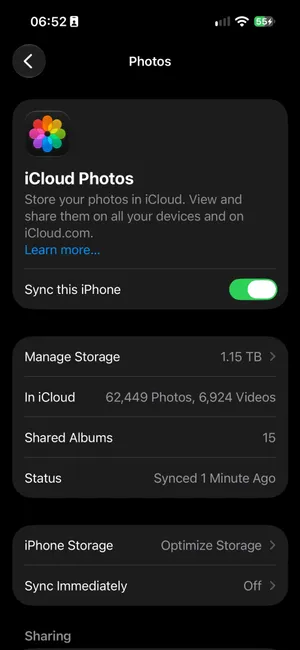
- Sync this iPhone is on: the library is in iCloud, and deletions spread. Note the In iCloud count, so you can compare it with the copy later.
- iPhone Storage says Optimize Storage: the iPhone may hold smaller versions while the full-resolution originals stay in iCloud. Apple says to download the originals to the iPhone before importing to a Windows PC, which may not be possible if the library doesn’t fit.
- Sync this iPhone is off: this iPhone may hold the only copy, so the copy matters even more.
Then copy it. Apple’s guide to transferring photos covers a cable to a Mac or a Windows PC. A Mac on the same Apple Account can hold full-size files with Download Originals to this Mac, but it’s still a synced library: a deletion reaches it too, so copy the files from it to a drive. For a smaller set, Apple’s Export Unmodified Originals route sends selected photos to an external drive. These copy routes come from Apple’s guides, and we haven’t captured those screens. Our guide to storing photos without iCloud compares the routes.
Check the copy before you trust it. Compare the counts in Photos, and remember that a folder of exported files can show more because Live Photos export as two files. Then open a few photos from the oldest year and a video or two. Leave one copy with your parent if you can. They’re their photos, and they should know where the copy is.
Do it with them, one story at a time
Sorting a parent’s photos alone gets you a tidier library. Doing it with them gets you what nobody else can supply: who that is, whose wedding, why that dog was there. Treat that as the point of the sessions, with the sorting as what happens along the way.
- Ask “who’s this?” rather than “keep or delete?” The first question is a pleasure. The second gets tiring fast.
- Keep by default. A photo goes only when your parent says so. What looks like junk to you may be the only picture of a kitchen they miss.
- Write it down as they say it. On any photo, swipe up to find the caption field. Apple says captions also make a photo easier to find in Search, so “Aunt Rosa’s 60th” works as both a note and a way back.
- Name the people. In the same panel, or under Collections › People & Pets, you can name a person or pet, and Photos names them in their other photos too.
- Keep doubts as doubts. “Dad thinks 1998, maybe ’99” tells a future reader more than a confident guess.
- Stop while it’s still fun. You want them to say yes to the next one.
If you live apart, you can do this on a call: our parents’ iPhone page explains how to see their screen over FaceTime, including the limits Apple sets.
If your parent has died
Please take this slowly. Nothing about sorting has a deadline. A few practical things are worth knowing early, because mistakes here are hard to undo. We haven’t been through these processes ourselves, so everything here comes from Apple’s pages, and your country’s rules may differ.
- Don’t erase or reset their devices yet. Apple says it can’t remove a device passcode without erasing the device, and that it can’t decrypt end-to-end encrypted data. The device may hold the only copy of something.
- Check whether they set up a Legacy Contact. A Legacy Contact can request access to account data that may include photos. They need the access key created when they were chosen, plus a death certificate (documents vary by country or region). Purchased movies, music and books, and passwords in iCloud Keychain, aren’t included.
- If there’s no Legacy Contact, Apple says it needs legal documents before it can help, generally including a death certificate. That means a court order in the US and some other places, and other paperwork in France, Germany, Japan, Australia and New Zealand.
If you can already open the photos, copy them first and leave the sorting for later, for as long as you like. If you do sort them, nothing on this page requires you to delete anything. The rest of the family may want to see them first.
Work in small sessions, by year or event
A library this size can’t be done in one go, and it doesn’t need to be. Pick one small slice that means something to your parent, rather than starting at the beginning. A year a grandchild was born is a better first session than the oldest photos on the phone.
| One session could be | Where to find it in Photos |
|---|---|
| One year | Library, swipe down, Years |
| One month’s events | Library, swipe down, Months |
| One trip | Collections › Trips |
| One person | Collections › People & Pets |
The Years and Months views help here. Apple says they’re curated to show the best shots and leave out similar photos, screenshots and receipts, so you and your parent can see what a year held without wading through it. They hide nothing from the library: tap All to see everything. Our guide to sorting photos by date has the steps, and how to fix a date that’s wrong.
Photos doesn’t record what you’ve already been through, so keep a short list in Notes: “2014 done, 2015 half”. Then you know where to start next time, and you can both see that it’s moving.
If your parent wants to clear things out as well, take the items that need few decisions first, and show them before you remove anything: screenshots, exact duplicates and accidental long videos. Our guide to deleting old photos year by year has the routine for the rest. Your parent can change their mind for 30 days, unless iCloud is over its limit, so leave Recently Deleted alone unless the space is needed.
What to do with the keepers
Keepers don’t need to go far. The aim is one place your parent can open without help.
- Make one album. Name it for what it’s for, such as “Best of the family” or “Grandkids”. An album only points to photos, so it uses no extra space, and removing a photo from it doesn’t delete the photo. A year or a trip can have its own small album once the first one feels too long.
- Put it where they’ll see it. Touch and hold the album and tap Pin, and it appears near the top of Collections.
- Share with the family, if your parent agrees. A Shared Album sends the keepers without opening the library. On iOS 27 it keeps full resolution and counts against the owner’s iCloud storage, including what others add. Our page on family photos across iPhones compares the options.
- Update the copy. An album isn’t a backup. After a few sessions, copy the keepers to the drive again, so the best of it exists in more than one place.
- Do less next year. If this gets going, picking a set number of photos each month is a far smaller job than this one was.
Everything you didn’t reach stays in the library, where Search and Years will still find it. That’s a fine place for it.
How PrunePic helps
PrunePic, our app, suits the sitting-together part. A grid of thumbnails is hard to talk over. One photo at a time, full screen, is much easier: you look, they talk, and someone swipes. It needs iOS 26 or later and runs on the iPhone that holds the photos, so check that first. It’s our app, so judge it with that in mind; the steps above work without it.

- It remembers where you got to. Every decision is saved, so each session starts with photos you haven’t been through, and you don’t need the Notes list.
- Keepers go straight to the album. Swipe up to keep, or swipe right and drop the photo on Favorite or a pinned album. They’re regular Photos albums, so your parent will find them in Photos.
- Nothing is deleted on a swipe. Swiped-left photos wait in the PrunePic Trash, where you can look through them together and put anything back. Then iOS asks to confirm, and they go to Recently Deleted.
- You choose the slice. Everything mode runs newest or oldest first. Trips & Moments, part of PrunePic Pro, shows one trip at a time and offers to put the keepers in an album named after it.
The free plan has a daily allowance in the Everything mode. PrunePic doesn’t make a copy of anything, so do that step first either way. Your photos never leave your device.
Checklist
- Ask your parent: may I look, may anything be deleted, may anything be shared?
- Look at Settings › [their name] › iCloud › Photos: is syncing on, and are originals on the iPhone?
- Copy the library to a computer or a drive, then check the count and open some old photos.
- Pick one year or event that matters to them.
- Go through it together, adding captions and names as they talk.
- Put the keepers in one album, and pin it.
- Note where you stopped, then stop.
- Share the album if they agree, and copy the keepers to the drive after a few sessions.
Frequently asked questions
Who should decide which of my parent's photos to keep?
Your parent, for as long as they can and want to. Agreeing to let you sort isn't the same as agreeing to delete or share, so ask about each separately. If they can't decide or don't want to, make a copy and keep everything until the family agrees on what happens next.
Do I need to go through all of them?
No. Sort the years or events your parent cares about most and leave the rest where it is. Old photos cost nothing unless storage is short, and if it is, clearing apps and long videos usually comes before sorting memories.
Is iCloud a safe copy of my parent's photos?
No. Apple says a photo deleted on one device is deleted everywhere iCloud Photos is used, and tells people to keep backup copies of their library. A safe copy is one on a computer or a drive that a deletion on the iPhone can't reach.
How do I save the story behind a photo?
Ask while you're looking at it, then type the answer in the caption field: open the photo in Photos and swipe up. Apple says captions also make a photo easier to find in Search. You can name people and pets in the same panel. If your parent is unsure of a date or a name, write that down too rather than guessing.
Can I get to a parent's photos after they have died?
It depends on what they set up. A Legacy Contact needs the access key from when they were chosen and a death certificate; documents vary by country or region. Without one, Apple asks for a court order or other legal documents, depending on where you live. Apple can't remove a device passcode without erasing the device, so don't erase anything until you know what's on it.
Can my brothers and sisters see the photos too?
Yes, once your parent agrees. A Shared Album lets you send the keepers without opening the whole library. On iOS 27, Apple says shared albums keep full resolution and count against the owner's iCloud storage, including what others add. Albums created on iOS 26 or earlier reduce photos to 2048 pixels on the long edge, so keep the originals elsewhere.
Keep reading
- FeaturesSwipe to delete photos, one at a timePrunePic shows your iPhone photos and videos one at a time. Swipe left to delete, up to keep, right to favorite. Nothing is gone until you empty the trash.
- FeaturesSort photos into albums while you swipePrunePic is a photo organizer for iPhone that files keepers as you clean: swipe right, drop the photo on a pinned album, or search your albums or create a new one.
- ScenariosMy mom's iPhone storage is fullHelping a parent with a full iPhone? What to check first, what is safe to clear without asking, and how to do it over FaceTime from your own phone.
- ScenariosOur family photos are scattered across everyone's iPhonesOrganize family photos when everyone has their own iPhone: when to use a Shared Library or a Shared Album, what to clean first, and how to keep a copy of it all.
 GuidesHow to organize photos on iPhoneOrganize iPhone photos with albums and folders without creating duplicates, see what Photos already sorts for you, and file a big library in short sessions.
- GuidesHow to delete old photos on iPhonePhotos has no delete-by-year button. Jump to an old year and drag to select, use a Date Taken shortcut, or review oldest first so you keep what still matters.